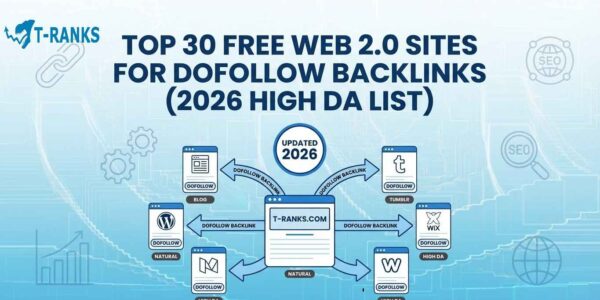
Web 2.0 backlinks are one of the easiest and safest ways to build authority and improve rankings in 2026.
They come from trusted blogging platforms like WordPress, Blogger, and Google Sites, where you can publish your own content with links to your website. These links help boost visibility, speed up indexing, and strengthen your site’s overall SEO profile.
Not all Web 2.0 sites still deliver value today, as Google now rewards quality content and active platforms while ignoring low-trust backlinks.
In this guide, you’ll find a verified list of the best 30 Web 2.0 sites tested for high domain authority, dofollow links, and indexing safety. You’ll also learn how to use them effectively and combine them with other link-building strategies for long-term SEO success
Are Web 2.0 Backlinks Safe in 2026?
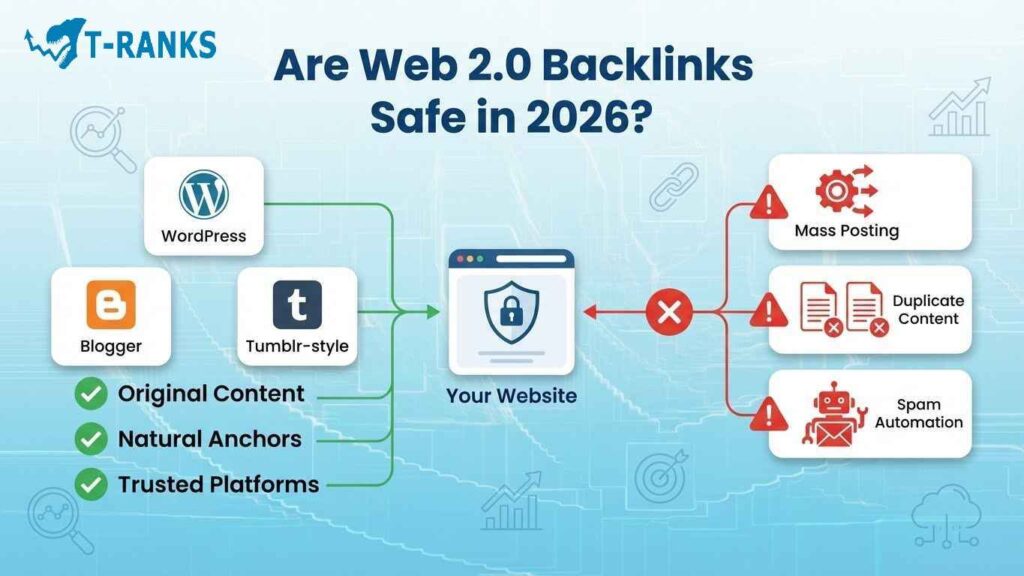
Yes, Web 2.0 backlinks are still one of the safest and most powerful ways to build authority in 2026. Google does not penalize Web 2.0 links by default. The real problem is how they are used. When people try to get quick results using mass posting, duplicate content, or spammy automation, it creates a clear footprint. That footprint, not the Web 2.0 itself, is what triggers penalties.
Web 2.0s are trusted, high-domain-authority platforms like WordPress, Blogger, and Tumblr. When you publish genuine content on them, search engines see it as a natural signal of credibility. These sites have strong reputations, which means links from them can safely pass ranking power to your main website if done correctly.
The key is to build every Web 2.0 property like a small blog of your own. Write helpful articles, add images, and link naturally to your site and other trusted sources such as Wikipedia. This shows Google that your content is made for readers, not for manipulation.
How to Keep Web 2.0 Backlinks Safe in 2026
- Write 600–800 words of original, useful content.
- Use a mix of branded, generic, and keyword-based anchor text.
- Add one link to your main website and one link to a high-quality external source.
- Keep your Web 2.0 active by posting new or updated content once a month.
- Never connect all your Web 2.0s together in a link wheel.
If used carefully, Web 2.0 backlinks act as safe, steady authority boosters. They work best when combined with other trusted methods like guest posts and PBN backlinks in a balanced SEO plan.
How We Ranked These 30 Sites (PPR Matrix Explained)
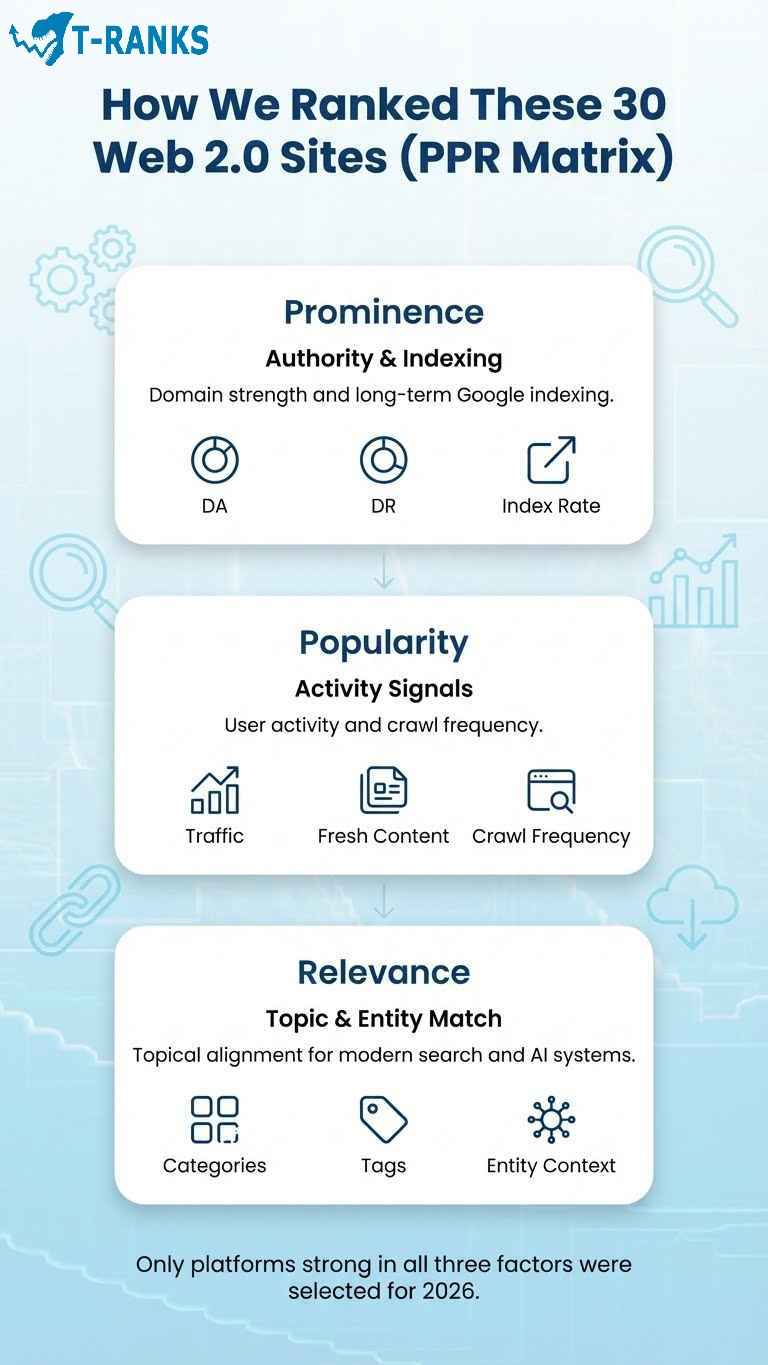
We used the PPR Matrix — Prominence, Popularity, and Relevance — to select the best Web 2.0 sites for 2026. This method helps identify platforms that not only have strong authority but also stay indexed and safe for long-term SEO. Instead of guessing which sites work, we tested each one using real data such as domain strength, active users, and topic relevance.
Our goal was simple: to include only those Web 2.0 platforms that can safely pass link power and remain visible in Google’s index for years. Many lists online recycle outdated names, but this one is built on real metrics and current ranking factors.
Prominence Factors (DA, DR, Index Rate)
Prominence means how powerful and trustworthy a website’s domain is. We checked each platform’s Domain Authority (DA) and Domain Rating (DR) using tools like Moz and Ahrefs. Websites with higher DA and DR scores are more likely to pass strong link equity. We also measured how often Google indexes their pages. If a Web 2.0 site keeps its pages indexed for months, it means it’s active, stable, and trusted by search engines. You can learn more about how internal and external links transfer value in this link equity guide.
Popularity Signals (User Traffic and Crawl Frequency)
Popularity shows how active and busy a platform is. Sites that have millions of users and fresh content published daily get crawled more often by Google. Platforms like WordPress and Medium scored high because they attract real visitors and keep their communities engaged. The more active a platform is, the faster your posts get indexed and the longer your backlinks stay effective.
Relevance and Entity Match for LLMs
Relevance means how closely a platform matches your topic or business niche. Large Language Models (LLMs) such as Google’s Gemini and ChatGPT understand context better when your links come from relevant, well-structured content. We checked if each Web 2.0 site allows topic categories, tags, and custom titles. These details help Google connect your Web 2.0 blog to your main website and recognize your brand as part of a real entity. Building this kind of semantic alignment is also essential in advanced link building where relevance plays a bigger role than raw authority.
By scoring all three factors Prominence, Popularity, and Relevance we found the Web 2.0 sites that truly help SEO without risk. These are the platforms that stay indexed, maintain authority, and remain effective for sustainable link building in 2026 and beyond.
30 Best Free Web 2.0 Sites for DoFollow Backlinks (2026 Update)
These are the top 30 Web 2.0 platforms that still provide real SEO value in 2026. Each platform was tested for domain authority, indexing stability, and user activity to ensure it can safely pass link equity. Unlike outdated lists that include inactive or penalized sites, this selection focuses on active, trustworthy domains where your posts can stay indexed for months.
All these platforms are free to use, allow long-form articles, and support images, tags, and links. When used correctly, they create natural backlinks that strengthen your site’s credibility and ranking power.
| Platform | DA (Approx.) | Link Type | Signup | Best For |
| WordPress.com | 92 | DoFollow | Simple | All Niches |
| Blogger.com | 90 | DoFollow | Simple | Local, General |
| Tumblr.com | 88 | DoFollow | Quick | Art, Lifestyle |
| Medium.com | 95 | NoFollow (High Trust) | Quick | Tech, Business |
| Weebly.com | 87 | DoFollow | Moderate | Portfolio, Local SEO |
| Wix.com | 88 | DoFollow | Moderate | Creative, Business |
| Google Sites | 91 | DoFollow | Moderate | Local SEO, Education |
| Jimdo.com | 84 | DoFollow | Simple | Small Business |
| Typepad.com | 80 | DoFollow | Moderate | Personal Blogs |
| LiveJournal.com | 79 | DoFollow | Simple | Creative Writing |
| Webnode.com | 82 | DoFollow | Simple | Business Pages |
| Zoho Sites | 83 | DoFollow | Moderate | B2B, SaaS |
| Pen.io | 76 | DoFollow | Instant | Micro Content |
| DeviantArt.com | 93 | DoFollow | Moderate | Art, Design |
| Instructables.com | 91 | DoFollow | Moderate | DIY, Tech |
| HubPages.com | 85 | DoFollow | Moderate | Education, Finance |
| Tealfeed.com | 70 | DoFollow | Moderate | Blogging, Marketing |
| Strikingly.com | 80 | DoFollow | Moderate | Startup, SaaS |
| Ucraft.com | 79 | DoFollow | Simple | Design, Marketing |
| Mozello.com | 78 | DoFollow | Simple | Personal, Small Business |
| Yola.com | 78 | DoFollow | Moderate | Business Sites |
| Wikidot.com | 80 | DoFollow | Moderate | Educational Content |
| Page.tl | 72 | DoFollow | Instant | General Topics |
| Postach.io | 75 | DoFollow | Simple | Journals, Notes |
| IM-Creator.com | 78 | DoFollow | Moderate | Portfolios |
| Slashdot.org | 91 | DoFollow | Moderate | Tech Discussions |
| Bluehost Blog | 89 | DoFollow | Moderate | Web Hosting, SEO |
| LaunchCDN.com | 74 | DoFollow | Moderate | SEO Hosting |
| Weebly Blog | 87 | DoFollow | Moderate | Tutorials, Guides |
| Jimdosite.com | 82 | DoFollow | Simple | Freelancers |
How to Choose the Right Platform
If your goal is to create long-form authority posts, WordPress, Blogger, and Weebly are the best options. For visual or creative content, Tumblr and DeviantArt are ideal because they rank well in Google Images. If you are targeting local SEO, platforms like Google Sites and Zoho Sites are strong choices since they support structured contact details and NAP citations.
Each of these platforms can safely act as a Tier-2 link buffer, supporting stronger assets like guest posts and white hat backlinks. Used together, they create a diversified backlink profile that strengthens your brand authority and helps pages rank more consistently across updates.
How to Build and Optimize a Web 2.0 Property (Step by Step)
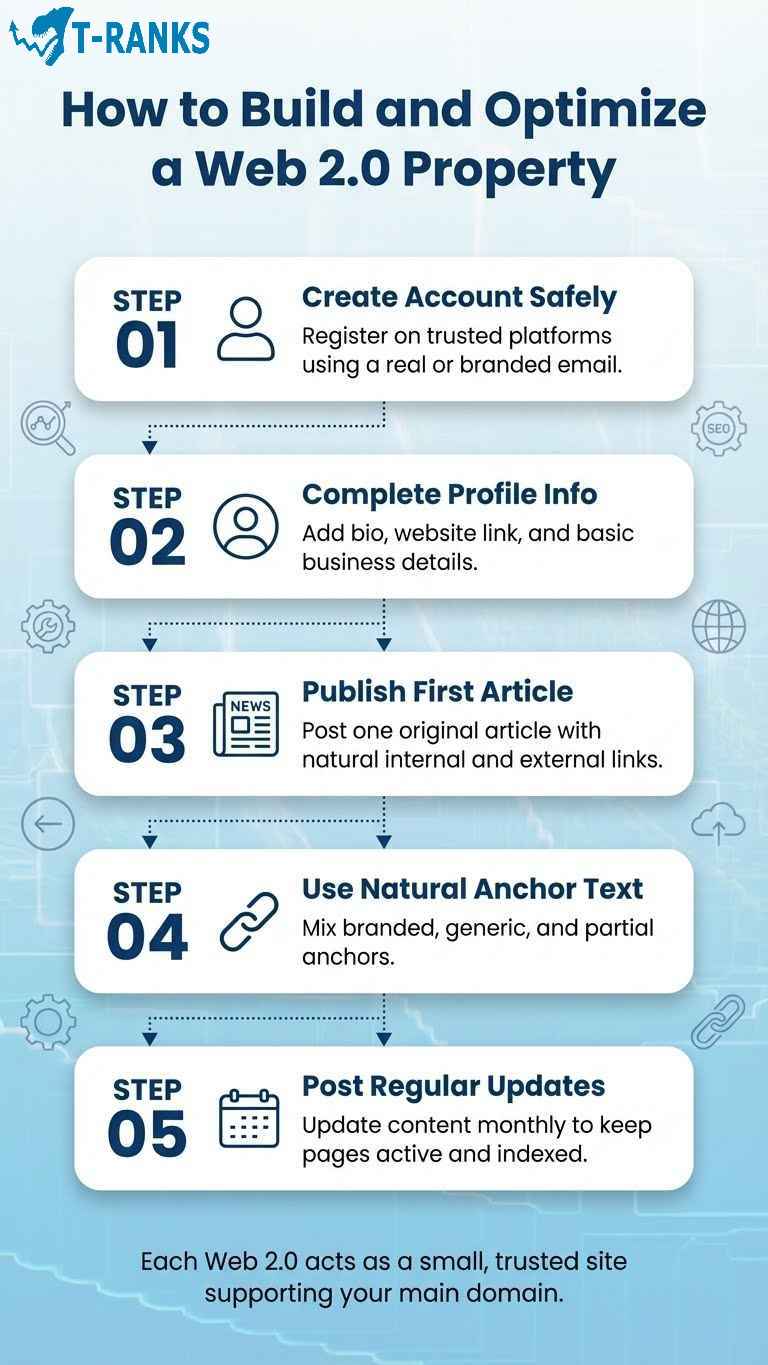
Creating a Web 2.0 property is simple, but optimizing it properly makes a big difference. Think of each Web 2.0 site as a small version of your main website. It should look real, provide value, and include useful links that make sense to readers. When done correctly, these properties help improve authority, keep your backlinks indexed, and increase your site’s visibility in Google.
Here is a clear, beginner-friendly guide you can follow.
Step 1: Create Your Account Safely
Start by registering on trusted sites like WordPress, Blogger, or Weebly. Use a professional or brand-related email address, not a temporary one. This makes your account look genuine and reduces the risk of deletion. Add your real name, logo, and short brand description where possible. Platforms such as Google Sites and Wix often index complete profiles faster because they appear authentic.
Step 2: Optimize Your Profile and Basic Information
Fill out all profile details such as your about section, website link, and social media handles. If you run a business, also include your NAP (Name, Address, and Phone). A complete profile helps build trust and connects your Web 2.0 pages to your main website more clearly. To understand how consistent contact details improve online visibility, visit our guide on local SEO backlinks.
Step 3: Publish Your First Blog Post
Write one clear and original post of about 600 to 800 words. Keep your language simple and easy to follow. Add:
- One link to your main website inside the article
- One link to a trusted external site such as Wikipedia or Forbes
- At least one image that supports your content
Avoid repeating the same keyword too often. Focus on writing something useful and relevant that feels natural to read.
Step 4: Use the Right Anchor Text
Anchor text is the clickable part of your link. It tells Google what your page is about. Use different types of anchors to keep your link profile safe:
- Branded anchors include your business name, for example, “T-RANKS.”
- Generic anchors include words like “read more” or “visit here.”
- Partial match anchors include a natural phrase that contains part of your main keyword.
If you want to learn how to balance these correctly, check our anchor text optimization guide for simple examples.
Step 5: Keep Posting Regularly
Update your Web 2.0 with new posts every few weeks. Even one post a month shows Google that your page is active. You can use built-in tools like the Blogger or WordPress scheduler to plan updates in advance. Consistent posting builds trust and helps your links stay indexed longer.
When you follow these five steps, each Web 2.0 property becomes a small, high-quality website that supports your main domain safely. Over time, these pages build authority, send referral traffic, and strengthen your overall SEO performance.
Web 2.0 Submission Checklist and Tracking Sheet (Free Template)

Managing your Web 2.0 properties correctly is the key to keeping them effective and safe. Many people create good backlinks but lose their impact because they never track them or check if they are still indexed. A proper checklist and tracking sheet will help you control every property, avoid duplication, and monitor SEO progress with ease.
Here is a full step-by-step submission checklist you can use for every new Web 2.0 site.
Web 2.0 Submission Checklist
- Create your account securely Register using a Gmail or branded email. Avoid using throwaway emails so you can recover your account if needed.
- Add complete profile details Upload a profile image, short bio, and add links to your social media accounts. A complete profile looks more trustworthy and helps indexing.
- Confirm email verification Always verify your email to activate your Web 2.0 account. This ensures your posts stay live and are easier to recover.
- Write one high-quality post (600–800 words) The article should be original and related to your niche. Add at least one image, a title tag, and a short conclusion.
- Use natural linking
- One link to your main website using relevant anchor text
- One link to a trusted source such as Wikipedia or Forbes
- Keep the links within the body of your article, not all at the end
- Submit and double-check your post Open the published page in a new tab and copy the live URL. Save this link in your tracking sheet.
- Check if the link is indexed Paste your page URL into Google Search using site:yourweb20url.com. If it does not appear, submit it manually through Google Search Console to speed up indexing.
- Record your metrics Use Ahrefs or Moz to check Domain Rating (DR), Domain Authority (DA), and spam score. Add this data to your sheet for future comparison.
- Add notes for anchor text Keep a record of which anchor you used for each property. This helps maintain variety and prevents over-optimization. For anchor balance, you can use tips from the anchor text optimization guide.
- Schedule updates every 30 days Post a new article or edit an existing one to show Google your site is active. Add the next update date in your sheet.
How to Build a Tracking Sheet That Works
Open Google Sheets and create these columns:
- Platform name (for example, WordPress, Blogger, Tumblr)
- Login email used
- Published URL
- Anchor text used
- DA and DR
- Indexing status (Indexed, Pending, or Lost)
- Last update date
- Next update date
Use a separate sheet for Tier-2 links that point to your Web 2.0s. This helps you see which ones are feeding link equity upward.
Pro Tip: Color-code your sheet. Use green for indexed pages, yellow for pending ones, and red for lost or deleted properties. This visual system makes it easy to manage large networks quickly.
Regular tracking helps you detect issues early, such as deindexed pages or broken links, before they harm your SEO. You can also combine this checklist with your backlink audit process to keep your entire link profile clean and penalty-free.
In the next section, we will compare Web 2.0 backlinks with other link types such as PBNs and guest posts to help you decide where each method fits best in your overall strategy.
Web 2.0 vs PBN vs Guest Posts – Link Type Comparison
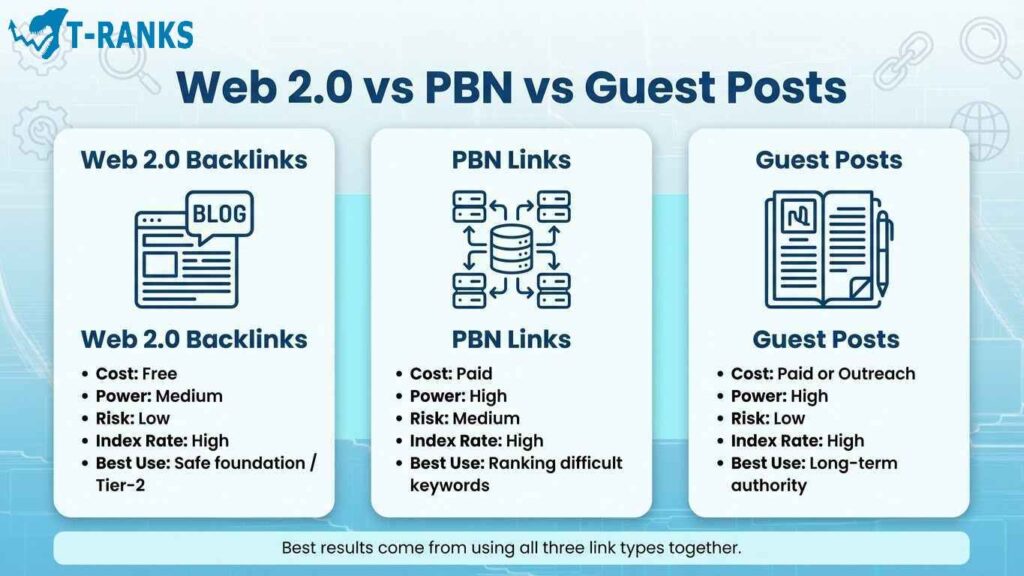
Different backlinks serve different goals, and knowing how to use each one correctly keeps your SEO safe and effective. Web 2.0s, PBNs, and guest posts all help improve rankings, but they differ in cost, power, and risk. The goal is not to choose one over the other but to combine them in a smart, natural way that supports your main website without raising red flags.
Here’s a simple comparison that beginners can easily understand.
| Link Type | Cost | Power | Risk Level | Index Rate | Best Use |
| Web 2.0 Backlinks | Free | Medium | Low | High | Safe starting links or tier-2 buffers |
| PBN Links | Paid | High | Medium | High | Boosting rankings for tough keywords |
| Guest Posts | Paid or outreach-based | High | Low | High | Long-term brand and authority growth |
When to Use Each Type
Web 2.0 Backlinks Web 2.0s are free platforms where you can publish your own articles with links to your site. They’re perfect for beginners or as a foundation layer in any link-building plan. Because they come from trusted websites like WordPress or Blogger, they add diversity and safety to your backlink profile.
PBN Links Private Blog Network (PBN) links come from strong aged domains that already have authority. They are very effective but need to be handled carefully. Using too many low-quality or linked-together PBNs can cause penalties. If you plan to use them, learn how to manage hosting, content, and footprints in this guide on building PBN links.
Guest Posts Guest posting means publishing your article on another real website in your niche. These links are powerful and safe because they come from active sites with real readers. They not only help SEO but also build brand awareness and trust. To learn how to find and contact the right sites, see our guest post outreach guide.
How to Combine Them for Best Results
The best strategy is to use all three together in layers.
- Use guest posts for your most important money pages.
- Use PBN links to power up your guest posts and pass stronger link equity.
- Use Web 2.0 backlinks as safe tier-2 links that connect your network and help everything get indexed faster.
This mix looks natural to Google and works for both short-term ranking boosts and long-term stability.
For even better results, study how link growth speed affects rankings in our guide on link velocity optimization. It explains how to grow your backlinks at a steady, natural pace that avoids penalties.
In the next section, we’ll explore advanced tier-2 link stacking with Web 2.0s and how this method can strengthen your PBN and guest post links safely.
Advanced Tier 2 Link Stacking with Web 2.0 Buffers
Tier 2 link stacking is a simple way to make your backlinks stronger and safer. Instead of linking your Web 2.0 blogs directly to your main website, you can link them to other backlinks that already point to your site. These can be your guest posts or articles on other websites. This helps your main site get more power from each link but keeps it safe from any direct risk.
How Tier 2 Link Stacking Works
Think of it like building three layers.
- The top layer is your main website or business page.
- The middle layer is your strong backlinks such as guest posts or PBN links.
- The bottom layer is your Web 2.0 blogs that point to those backlinks.
When Google crawls these links, the power flows from the bottom layer to the top. This makes your backlinks stronger and helps them stay indexed for a long time. It also protects your main website because the links are not pointing to it directly.
How to Create Tier 2 Web 2.0 Links
- Choose five to ten Web 2.0 sites from your list such as WordPress, Blogger, or Tumblr.
- Write a short post of 400 to 600 words about a similar topic as your backlink.
- Add one link to your guest post or PBN link instead of your main website.
- Add one more link to a trusted website like Wikipedia to make your article look natural.
- Use natural and simple anchor text such as your brand name or a general phrase like “read more.”
- Share your new Web 2.0 post on a social platform such as Reddit or Twitter to help Google find and index it faster.
How This Method Helps PBN Links
If you use PBN links, this method gives them more safety and strength. By pointing Web 2.0 blogs to your PBN posts, you make your link network look more natural. It also helps Google crawl your PBN pages more often so they stay indexed and pass more value.
For example, if one of your PBN articles links to your homepage, you can create two or three Web 2.0 posts that link to that same PBN article. This adds an extra layer of trust and keeps your website safe.
To learn how to manage your PBN sites properly, visit our guide on PBN management tools. When you combine well-managed PBNs with Web 2.0 buffers, you get a strong and stable backlink setup that supports your site for the long term.
.
Using Web 2.0 Sites for Local SEO and Citations
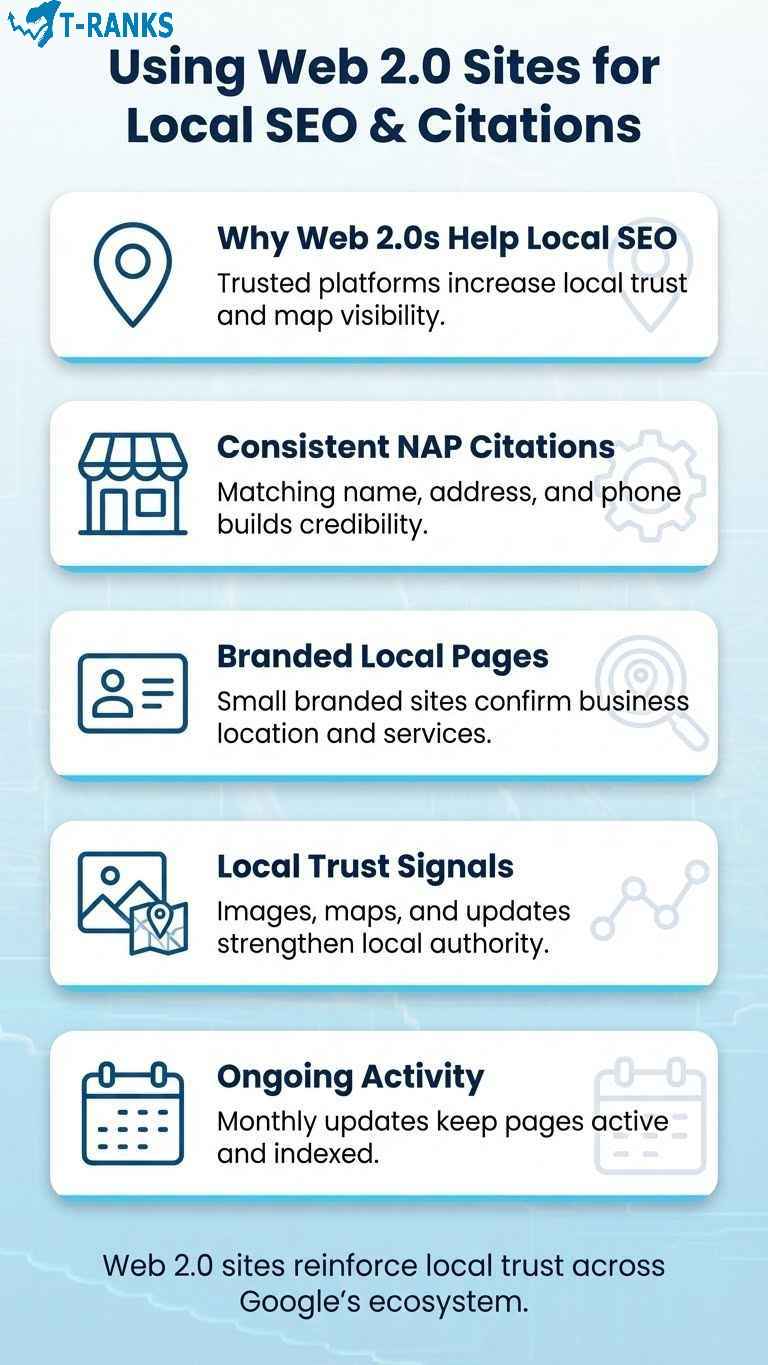
Web 2.0 sites are a simple and effective way for local businesses to appear higher in Google search results. These free platforms let you create small branded websites that include your business name, address, phone number, and website link. When this information matches what appears on your main site and your Google Business Profile, Google starts trusting your brand more. This trust helps you rank better in map and local search results.
Why Web 2.0s Work for Local SEO
Web 2.0 platforms such as Google Sites, WordPress, and Blogger are considered reliable by search engines. Publishing your business details on these websites creates citations that confirm your business is real and active. Google often uses these mentions to verify local information, which can increase your visibility in Google Maps.
Unlike directory submissions, Web 2.0 sites let you control how your content looks. You can add images, videos, reviews, or service pages that make your business look more professional. These small but active sites help search engines understand what your business does and where it is located.
How to Build a Local Web 2.0 Property
- Create a site on Google Sites, WordPress, or Blogger using your business name.
- Write an “About Us” page that clearly shows your name, address, and phone number.
- Add a Google Map showing your location. You can embed this directly from Google Maps.
- Upload images of your shop, products, or staff. Use descriptive file names such as bakery-front.jpg or team-photo.jpg.
- Add one link to your main website and another to your Google Business Profile.
- Post at least once a month with updates such as new offers, customer stories, or events.
These steps help Google connect your business information across multiple platforms. Over time, this improves your local authority and helps your brand appear in more “near me” searches.
If you already have other backlinks built, you can strengthen them further by linking from your Web 2.0 pages to your local citations or business directories. This helps pass link value between your assets.
For consistent results, make sure your NAP (Name, Address, and Phone number) stays the same everywhere online. To learn how to manage this part effectively, read our full guide on local SEO backlinks which explains how to build local links step by step.
Web 2.0 platforms give small businesses a cost-free way to improve visibility, build trust, and keep local information consistent across the web.
Automation Tools and Management Apps for Web 2.0 in 2026
Managing several Web 2.0 sites manually takes time, especially when you post often or handle multiple clients. Using simple management tools can help you stay organized, schedule updates, and keep your Web 2.0 blogs active without spending hours on manual work. The goal is to save time while keeping your content natural and human.
Why Use Tools for Web 2.0 Management
Web 2.0 tools help you:
- Schedule and publish posts on multiple sites automatically
- Store login details and post URLs in one place
- Monitor which pages are indexed or need updates
- Track backlinks, anchor texts, and content performance
When used properly, these tools make your workflow smoother and help you manage large sets of properties safely.
Best Web 2.0 Tools to Try in 2026
JetSEO JetSEO is a simple automation platform that lets you upload multiple articles, schedule publishing dates, and check link indexing. It is ideal for SEOs who want a clean dashboard to track Web 2.0 backlinks and posts.
FCS Networker FCS Networker allows you to manage several Web 2.0 blogs at once. You can create posts, schedule them, and drip-feed content over days or weeks to make it look natural to Google.
SyndWire SyndWire focuses on distributing your content across multiple Web 2.0, bookmarking, and social media sites. You can publish one article and have it appear on different platforms at the same time. It’s great for building tier 2 backlinks that support your guest posts or PBN links.
Best Practices for Safe Automation
Automation works best when it supports your work, not replaces it. Follow these simple rules:
- Always check each article before publishing to make sure it reads naturally.
- Avoid using spun or repeated content. Write short, unique versions for each site.
- Add images, headings, and author details to make posts look real.
- Do not post on too many sites at once. Spread activity across several days.
- Keep full control over anchor text and links so your profile stays natural.
These small habits keep your Web 2.0 network safe and believable. Automation should help you stay consistent, not take shortcuts.
If you plan to manage large numbers of backlinks, consider connecting these tools with a professional SEO tracker like Ahrefs or Moz to monitor indexing and performance.
Used the right way, automation tools help you maintain regular posting schedules, improve organization, and keep all your Web 2.0 properties active and healthy through 2026.
In the next section, we will look at common mistakes that can cause Web 2.0 penalties and how to avoid them completely.
Common Web 2.0 Mistakes That Can Harm SEO

Web 2.0 backlinks work well only when they are built correctly.
Many beginners make small errors that stop their backlinks from helping or, worse, make them look spammy. These mistakes usually happen because people try to move too fast or copy the same process on every site.
Below are the most common issues and how to fix them easily.
1. Reusing the Same Article on Every Site
Copying your article across several Web 2.0 sites can lead to deindexing. Google can recognize repeated content very quickly.
Fix: Write a fresh version of your post for each site. Change the headline, first paragraph, and examples to make it different.
2. Using the Same Keyword as Anchor Text
Repeating the same keyword in every backlink makes your links look forced. Search engines prefer variety.
Fix: Mix different anchor types such as branded, generic, and partial phrases. You can learn simple examples in our anchor text optimization guide.
3. Building Too Many Links at Once
Creating dozens of Web 2.0 blogs in one week looks unnatural to Google.
Fix: Build a few every month. Slow and steady growth looks more real and keeps your backlinks safe.
4. Leaving Profiles Empty
Web 2.0 sites with no profile picture or description appear fake and often get removed.
Fix: Add a name, logo, short bio, and website link to every profile. A complete page builds trust and helps indexing.
5. Linking All Web 2.0 Blogs Together
Connecting all your Web 2.0 sites in a circle, sometimes called a link wheel, can get your links flagged.
Fix: Treat each blog as separate. Link only to your main site or to one guest post, not to other Web 2.0s.
6. Forgetting to Check Indexing
A backlink has no value if Google has not indexed it.
Fix: Search your Web 2.0 page on Google using site:yoururl.com. If it doesn’t show up, update the post or submit it through Google Search Console.
7. Writing Thin or Unrelated Content
Publishing short or off-topic articles only for link building hurts credibility.
Fix: Write short but useful posts that match your niche. Add examples, lists, or a short guide that helps readers.
8. Not Updating Old Posts
Abandoned blogs often lose ranking power or get deleted by the platform.
Fix: Add new posts or small updates every few weeks. Even changing the image or adding a new paragraph keeps the blog active.
Avoiding these simple mistakes will make your Web 2.0 backlinks stronger and more natural. Each post will pass real value and stay safe in Google’s index for the long term.
Conclusion
In conclusion, Web 2.0 backlinks remain one of the most reliable and beginner-friendly ways to build authority, improve indexing, and enhance your site’s credibility in 2026. When created with genuine content, natural anchors, and consistent updates, they provide safe, lasting SEO value that complements every other link type.
A well-maintained Web 2.0 network helps you earn trust, diversify your backlink profile, and strengthen your online presence without risk. Focus on quality over quantity—each properly built property becomes a small, independent source of authority for your brand.
Want to skip the setup hassle? Boost your rankings faster with T-RANKS custom Web 2.0 backlink packages designed for safe, high-authority link growth in 2026.
FAQs About web 2.0 sites list
Do Web 2.0 backlinks still work in 2026?
Yes, Web 2.0 backlinks still work effectively in 2026 when used with quality content and natural anchors. Google continues to value links from trusted, user-generated sites like WordPress and Blogger when they stay indexed and relevant.
Are Web 2.0 backlinks safe for SEO?
Yes, Web 2.0 backlinks are among the safest link-building options when managed properly. They are hosted on high-authority domains, and risk only appears when people use duplicate content or spammy linking patterns.
How long does it take for Web 2.0 links to get indexed?
Most Web 2.0 links index within three to seven days if the post is unique and contains outbound links to authority sites. Submitting your URL through Google Search Console or sharing it on social platforms speeds up indexing.
How many Web 2.0s should I create per page?
Three to five high-quality Web 2.0 blogs per main page is enough to start. It’s better to add new ones slowly each month rather than creating dozens at once.
Do Web 2.0 backlinks pass link equity?
Yes, Web 2.0 links can pass real link equity if the site allows dofollow links and your content remains indexed. Always check the page source for “rel=dofollow” attributes before counting them as ranking signals.
Should I interlink my Web 2.0 sites?
No, you should not interlink your Web 2.0 properties. Doing so creates a footprint that makes your network look artificial and may reduce its SEO value.
Is it better to link Web 2.0s to my main site or tier-one links?
It’s safer to point Web 2.0 backlinks to your tier-one links such as guest posts or PBNs. This builds a natural layer of protection for your main domain while still passing authority.
Do I need to keep posting on my Web 2.0 blogs?
Yes, regular posting keeps your Web 2.0 blogs active and trusted by Google. Even one new post or small update each month helps maintain indexing and link strength.
Are Web 2.0 backlinks safe for YMYL niches like finance or health?
Yes, they are safe if your content is accurate, helpful, and supported with trusted citations. Avoid making claims or giving advice that isn’t backed by reliable sources.
Can small businesses use Web 2.0s for local SEO?
Yes, small businesses can use Web 2.0s to boost local SEO by including consistent name, address, and phone number details. Platforms like Google Sites and Blogger work well for citation building.
What’s the biggest mistake people make with Web 2.0 link building?
The biggest mistake is posting the same article on multiple platforms. Duplicate content gets ignored or deindexed, wasting your effort and making links less valuable.
Can I automate Web 2.0 posting safely?
Yes, you can automate posting with tools like JetSEO or FCS Networker, but always review content manually. Automation should help with scheduling, not replace human editing or quality checks.
Do Web 2.0 backlinks help with AI Overviews and voice search rankings?
Yes, they can indirectly help by increasing your topical coverage and brand presence. Google’s AI systems prefer well-linked, informative content that shows real expertise.
Can Google detect low-quality Web 2.0 backlinks?
Yes, Google can detect spammy or mass-produced Web 2.0s. Using unique content, balanced anchors, and trusted platforms keeps your links safe from detection or devaluation.
What happens if my Web 2.0 backlinks get deleted?
Deleted Web 2.0s lose all link value immediately. Always track your URLs in a spreadsheet and replace inactive links with new ones on fresh platforms.
How often should I update my Web 2.0 sites?
Updating once every 30 to 45 days is enough to show activity. Adding a short article, image, or service update signals freshness and helps maintain indexing.
Can I build Web 2.0 backlinks without writing new content?
No, using copied or AI-generated content without editing can cause fast deindexing. Writing simple, original articles or using light rewrites ensures long-term safety and better results.
Do Web 2.0s still matter if I already use guest posts?
Yes, Web 2.0s still matter because they support and strengthen your existing backlinks. They act as tier-two buffers that improve indexing and link flow for your guest posts and main pages.
Which is better for beginners, Web 2.0s or PBNs?
Web 2.0s are much better for beginners. They are free, safe, and easy to manage, while PBNs require investment, hosting setup, and risk control.
Can I hire experts to create Web 2.0 backlinks for me?
Yes, professional services like T-RANKS Web 2.0 backlink packages can build high-quality, indexed properties for you. These packages save time while ensuring every Web 2.0 follows safe SEO practices.