Most link building campaigns do not fail because of bad outreach emails. They fail because the outreach process becomes messy, inconsistent, and impossible to manage once the campaign starts growing.
A link building CRM helps SEO teams organize outreach workflows, track follow-ups, manage publisher relationships, and monitor backlink placements inside one structured system. Instead of relying on scattered spreadsheets, disconnected inboxes, and manual reminders, a CRM turns outreach into a repeatable pipeline that is easier to scale and report on.
This becomes especially important when campaigns involve multiple clients, large prospect lists, recurring publisher relationships, or team collaboration. Without a structured outreach pipeline, common problems like missed follow-ups, duplicate outreach, weak personalization, and poor reporting quickly start reducing campaign performance.
This guide explains how link building CRM workflows actually work, what data SEO teams should track, how outreach pipelines are structured, which tools fit different workflows, how AI is changing outreach management, and the common CRM mistakes that quietly damage campaign results over time.
What Is a Link Building CRM?

A link building CRM is software that helps SEO teams manage outreach campaigns, track backlink prospects, organize follow ups, and monitor link placements through a structured outreach pipeline.
Link building outreach works like a sales pipeline because every prospect moves through multiple stages before becoming a live backlink opportunity. IF outreach campaigns are not managed through a structured system, SEO teams often lose track of conversations, follow ups, and publisher relationships.
Most link building CRM systems organize outreach into stages such as:
- prospecting
- contacted
- followed up
- negotiation
- link placed
A link building CRM keeps the entire outreach workflow organized in one place. SEO teams use these systems to track prospect activity, manage outreach history, monitor campaign progress, and maintain visibility across active outreach campaigns.
Modern link building depends heavily on organization and relationship management. As outreach campaigns grow, a structured link building CRM helps teams manage larger prospect databases, maintain consistent follow ups, and scale outreach operations more efficiently.
Why Most Link Building Outreach Pipelines Fall Apart
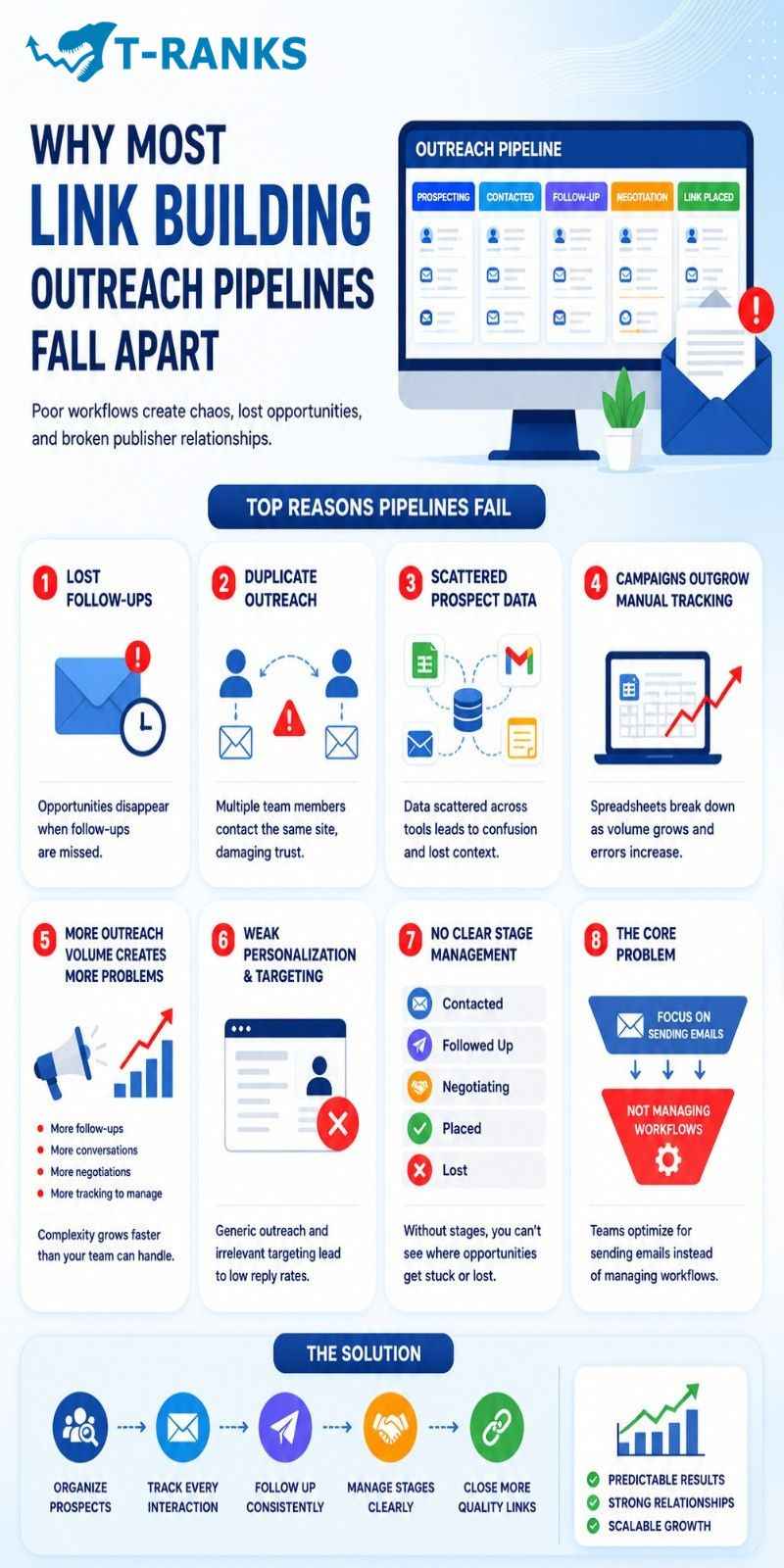
Most link building outreach pipelines fail because teams focus on sending emails instead of managing the outreach process.
When there is no clear system for tracking status, follow-ups, and ownership, prospects get lost and publisher relationships become harder to manage.
The breakdown usually starts with poor organization, then gets worse as outreach volume increases. More outreach without better workflow control creates duplicate contact, missed replies, and inconsistent personalization.
Lost follow-ups
One of the most common outreach problems is sending the first email and never returning to the prospect. Many backlink placements happen after follow-ups, so without reminders or status tracking, opportunities quietly disappear.
This becomes even more damaging as campaigns grow because outreach conversations start moving faster than the team can manually track them.
Duplicate outreach
Duplicate outreach happens when multiple team members contact the same website without realizing it. This usually occurs when outreach activity is spread across separate inboxes, spreadsheets, or notes.
Repeated outreach damages trust with site owners and makes the outreach process look disorganized.
Scattered prospect data
Many outreach campaigns fail because prospect information is stored in too many places. Contact history, outreach notes, and placement discussions often become scattered across:
- spreadsheets
- email threads
- notes apps
- disconnected outreach tools
Once outreach data becomes fragmented, teams lose visibility into what was already discussed and what action should happen next.
Campaigns outgrow manual tracking
A spreadsheet may work for a small outreach campaign, but it becomes harder to manage as prospect volume increases. Manual updates, missing records, and inconsistent tracking become more common once campaigns scale beyond a manageable size.
The larger the outreach pipeline becomes, the more important structured workflow tracking becomes.
More outreach volume creates more problems
Many teams assume sending more emails will improve results, but poor workflows usually become worse at higher volume. More outreach creates:
- more follow-ups
- more conversations
- more negotiations
- more placement tracking
Without a structured outreach system, campaign complexity grows faster than the team’s ability to manage it effectively.
Weak personalization and targeting
Outreach pipelines also fail when teams focus only on volume instead of relevance. Generic outreach templates and weak prospect targeting reduce reply rates and damage long-term relationship building.
Strong outreach campaigns depend heavily on relevance, personalization, and proper prospect qualification.
No clear stage management
Many teams do outreach activity without managing outreach stages. Prospects are never clearly marked as:
- contacted
- followed up
- negotiating
- placed
- lost
Without stage tracking, teams cannot identify where opportunities are slowing down or disappearing inside the pipeline.
The core problem
Most outreach pipelines fail because the team optimizes for sending emails instead of managing workflows. Once outreach becomes a structured process with clear stages, tracking, and follow-up discipline, campaign management becomes far more predictable and scalable.
CRM or Spreadsheet — Which One Does Your Outreach Actually Need?

Use a spreadsheet if your outreach is still small, simple, and mostly handled by one person. Switch to a dedicated CRM when follow-ups, team visibility, and pipeline tracking become difficult to manage reliably.
When a Spreadsheet Is Still Enough
A spreadsheet works well for solo SEO workflows, small campaigns, and low monthly prospect volume. It is useful when you mainly need a lightweight system for tracking contacts, notes, and basic outreach status.
For early-stage outreach, a spreadsheet can be the fastest way to stay organized without adding extra software complexity.
When Spreadsheets Start Creating Problems
Spreadsheets start failing when missed follow-ups, duplicate outreach, and weak visibility become common. They can store outreach data, but they do not naturally manage workflow discipline, stage tracking, or task ownership.
Once multiple people start working inside the same outreach campaign, spreadsheets become harder to maintain accurately and easier to turn into large unstructured data dumps.
When a Dedicated Link Building CRM Makes Sense
A dedicated CRM becomes more useful for agencies, multi-client campaigns, larger prospect databases, and team collaboration. CRM systems are built to manage outreach stages, follow-ups, relationship history, and reporting inside one centralized workflow.
If outreach operations are growing beyond manual oversight, a CRM usually prevents the exact problems that slow campaigns down:
- lost context
- duplicate contact
- inconsistent follow-ups
- poor workflow visibility
The Real Difference Is Workflow Management
A spreadsheet stores outreach information.
A CRM manages the outreach process itself.
As outreach campaigns grow, workflow management becomes more important than simple data storage. A structured CRM helps SEO teams maintain better organization, visibility, and control across the entire outreach pipeline.
What Data Should You Track Inside a Link Building CRM?

A strong outreach pipeline depends more on clean data structure than the tool itself. The goal is to track enough information to manage follow-ups, prioritize prospects, verify placements, and report results without creating unnecessary clutter.
Contact and Website Information
Track the basic contact and website details first. These fields help identify who was contacted, where the opportunity exists, and who owns the conversation.
Most link building CRM systems track:
- website name
- website URL
- contact name
- email address
- job title or editor role
Without this core information, follow-ups become inconsistent and duplicate outreach becomes harder to avoid.
Website Quality Metrics
Website quality metrics help SEO teams qualify prospects before outreach begins. These signals make it easier to prioritize relevant opportunities instead of treating every website equally.
Most teams track:
- Domain Rating (DR)
- Domain Authority (DA)
- estimated organic traffic
- topical relevance
- link profile quality
A strong CRM should make it easy to compare prospects by both authority and relevance.
Outreach Activity Tracking
Outreach activity tracking helps teams understand where each prospect currently sits inside the pipeline and what action should happen next.
Most CRM systems track:
- outreach status
- first contact date
- last activity
- follow-up schedule
- outreach history
This layer prevents lost follow-ups, improves team alignment, and creates better visibility across active outreach campaigns.
Campaign and Link Tracking Fields
Campaign tracking fields connect outreach activity directly to backlink placements and SEO reporting.
Important fields usually include:
- link type
- target page
- outreach angle
- anchor text
- live link URL
- placement status
- paid vs free placement tracking
These fields turn the CRM into a complete campaign record rather than just a contact database.
Data Structure Rule
The most useful CRM fields are the ones that support action. Every field should help the team qualify prospects, manage follow-ups, track negotiations, verify placements, or report campaign performance.
If a field does not support a real outreach decision or workflow step, it is usually optional. Clean systems are easier to maintain and scale than overloaded databases.
Practical Field Set
A simple high-value CRM setup usually includes:
- contact name, email, and role
- website name and URL
- DR or DA, traffic estimate, and relevance tag
- outreach status and follow-up dates
- target page, anchor text, and live link URL
- placement status and link type
This structure keeps the outreach pipeline organized while remaining easy for teams to update consistently.
The 6 Stages Every Link Building Outreach Pipeline Needs

A link building outreach pipeline usually moves through six stages: prospecting, contacted, followed up, negotiation, link placed, and lost or rejected.
These stages help SEO teams organize outreach workflows, track campaign progress, and manage prospects more consistently.
Stage 1: Prospecting
Every outreach campaign starts with prospecting. At this stage, the goal is to identify websites that are relevant enough to contact.
Teams usually review:
- topical relevance
- Domain Rating (DR)
- organic traffic
- link profile quality
- contact availability
No outreach happens yet. The focus is qualification and filtering. A strong prospecting stage prevents low-quality websites from entering the active outreach pipeline.
Stage 2: Contacted
Once a qualified prospect receives the first outreach email, it moves into the contacted stage.
The CRM should record:
- outreach date
- sender
- outreach notes
- personalization details
- response status
This stage gives the team visibility into which prospects are active and which conversations have already started.
Stage 3: Followed Up
Most outreach campaigns are won during follow-ups, not during the first email.
Many editors miss the original message, which is why follow-up timing matters heavily in link building outreach. A structured CRM helps teams:
- schedule follow-ups
- track outreach history
- avoid messaging too aggressively
- maintain consistent communication
The goal is to keep the conversation active without making the outreach repetitive or spam-like.
Stage 4: Negotiation
Once a prospect responds positively, the outreach moves into negotiation.
At this stage, teams may discuss:
- content ideas
- placement requirements
- pricing terms
- anchor text
- target pages
- publishing timelines
This is where outreach becomes an active working relationship instead of simple cold emailing. The CRM should track what was approved, what is still pending, and what actions still need completion.
Stage 5: Link Placed
After the backlink goes live, the opportunity moves into the link placed stage.
The placement should always be verified manually before marking the process complete. Teams usually confirm:
- live backlink URL
- anchor text placement
- target page accuracy
- follow vs nofollow status
Placement verification is important because published links sometimes contain incorrect URLs, anchor text changes, or unexpected attributes.
Stage 6: Lost or Rejected
Not every outreach opportunity results in a backlink placement.
Some prospects never respond, some reject the outreach, and some negotiations fail before publication. Instead of deleting these records, they should move into a separate lost or rejected stage.
This helps teams:
- maintain cleaner pipelines
- improve reporting accuracy
- identify weak outreach patterns
- review failed opportunities later
A well-structured outreach pipeline works because every prospect has a clear place inside the workflow and a clear next action.
How to Run Your Link Building Outreach Pipeline Step by Step
A link building outreach pipeline works best when every prospect moves through a clear process from discovery to verified backlink placement.
Most outreach campaigns fail because the workflow is inconsistent. Teams find prospects, send emails, and follow up randomly without a structured system. A proper outreach pipeline fixes this by turning link building into a repeatable process that is easier to manage, scale, and report on.
Step 1: Find and Add Qualified Prospects
The first step is finding websites that actually make sense for your niche and audience.
Many SEO teams make the mistake of collecting large prospect lists based only on Domain Rating (DR). High authority alone does not make a website valuable. Relevance matters just as much.
A good prospect usually:
- covers related topics
- publishes active content
- links to external resources naturally
- has real organic traffic
- fits your audience
Most outreach campaigns start with:
- competitor backlink analysis
- Google search operators
- resource page searches
- industry blogs
- outreach discovery tools
For example, if competitors already earned links from a website, there is a higher chance that the site accepts similar editorial outreach opportunities.
Before adding a prospect to the CRM, quickly review:
- topical relevance
- traffic quality
- content freshness
- outbound link quality
- contact availability
This first filtering step protects the rest of the outreach pipeline. A smaller qualified list almost always performs better than a large unfiltered database.
Step 2: Organize and Prioritize Outreach Opportunities
Once prospects are added, the next step is organizing them properly.
Without structure, outreach pipelines quickly turn into random collections of URLs, making follow-ups and prioritization difficult.
Most SEO teams organize prospects by:
- niche
- authority level
- link type
- outreach angle
- campaign goal
For example, guest post opportunities usually require different messaging than resource page outreach or digital PR campaigns.
It also helps to separate:
- high-priority editorial sites
- quick-win opportunities
- relationship-based prospects
- paid placement discussions
This makes outreach management much easier because the team knows which opportunities deserve deeper personalization and which campaigns can move faster.
Step 3: Send Outreach Emails and Track Activity
Once the prospect list is organized, outreach begins.
Every email should be logged inside the CRM, including:
- outreach date
- sender
- outreach angle
- response status
- personalization notes
This is important because successful outreach depends heavily on context. The CRM should show not only that an email was sent, but also why the message was relevant to that specific website.
Good outreach emails are usually:
- short
- personalized
- relevance-focused
- easy to understand
The best outreach messages reference something specific about the website, article, audience, or content style. Generic templates often fail because they sound mass-produced.
Subject lines also matter more than many teams realize. Clear and natural subject lines generally perform better than overly promotional or clickbait-style wording.
Step 4: Follow Up Without Looking Like Spam
Most outreach replies happen after follow-ups, not after the first email.
This is why follow-up structure is one of the most important parts of a link building outreach pipeline.
A good follow-up does not simply repeat the first message. Instead, it moves the conversation forward by:
- adding context
- clarifying value
- reducing friction
- making the request easier to evaluate
For example, a follow-up may reference:
- a relevant article
- an updated resource
- additional context
- a simplified collaboration idea
Timing also matters. Sending follow-ups too aggressively makes outreach look automated, while waiting too long causes opportunities to disappear.
Many SEO teams also use breakup emails after several unanswered follow-ups. These emails politely close the conversation while leaving the relationship open for future opportunities.
Step 5: Manage Negotiations and Track Placements
Once a prospect responds positively, the workflow shifts from outreach into relationship and placement management.
At this stage, conversations often include:
- content requirements
- placement terms
- publishing timelines
- target pages
- anchor text approval
- pricing discussions
This is where many outreach workflows become messy because details get buried inside email threads.
A structured CRM helps track:
- submitted content
- pending approvals
- revision requests
- negotiation history
- placement progress
Clear tracking becomes especially important when multiple team members are involved or when campaigns manage many active placements at the same time.
Step 6: Confirm Links and Close the Campaign Record
The final step is verifying the backlink before closing the outreach record.
A promised placement is not the same as a verified live backlink. Teams should manually confirm:
- live link URL
- anchor text placement
- destination page accuracy
- follow vs nofollow status
- placement context
Sometimes publishers change anchor text, remove links, or publish the backlink incorrectly. Verification prevents these problems from going unnoticed.
Once the backlink is confirmed, the CRM should update:
- placement status
- completion date
- live link records
- campaign reporting data
This completed data becomes valuable long-term reporting information because it helps SEO teams analyze:
- reply rates
- placement rates
- outreach ROI
- successful outreach angles
- backlink quality trends
A structured outreach pipeline works be
How to Use a CRM for Long Term Link Building Relationships

Use a link building CRM to organize publisher relationships, track communication history, and build recurring outreach opportunities over time.
Long-term link building works better when publishers already know your brand and outreach style. A CRM helps SEO teams manage these relationships in a structured way instead of restarting outreach from zero every time.
Step 1: Track publisher history
The first step is storing the full history of every publisher interaction inside the CRM. This includes previous placements, outreach conversations, editorial preferences, and pricing discussions.
Keeping this history in one place helps future outreach feel more natural because the team already understands how the publisher works and what type of collaboration performs best.
Step 2: Organize publishers with tags and segments
Once relationship history is tracked, the next step is organizing contacts properly.
Most SEO teams use tags to group publishers by niche, relationship strength, response quality, or collaboration type. For example, repeat partners can be separated from first-time outreach prospects.
This makes it easier to prioritize warm relationships and organize future campaigns more efficiently.
Step 3: Build recurring partnerships
After strong contacts are identified, the focus shifts toward maintaining recurring partnerships instead of relying only on cold outreach.
Publishers who already trust the outreach team usually respond faster and are more open to future collaborations. Over time, these recurring relationships create a more stable and predictable outreach pipeline.
Step 4: Separate outreach from relationship management
Not every contact should remain inside active outreach campaigns. Some publishers are better managed through long-term relationship workflows after the first successful placement.
A CRM helps teams track whether a contact is active, recurring, nurturing, or inactive. This keeps outreach more organized and prevents over-emailing trusted publishers.
Why this matters
Long-term link building becomes more effective when every interaction adds context for the next one. A CRM stores that context so outreach becomes relationship-driven instead of purely transactional.
Over time, relationship-based outreach usually leads to higher reply rates, stronger publisher trust, and more sustainable backlink opportunities.
Manual Outreach vs Automation — Where Each One Belongs in Your Pipeline
Manual outreach means sending personalized emails manually, while automated outreach uses software to manage repetitive outreach tasks and email sequences automatically.
Both approaches are used in modern link building pipelines, but they solve different problems. Manual outreach improves personalization and relationship building, while automation improves workflow efficiency and outreach scalability.
| Factor | Manual Outreach | Automated Outreach |
| Main purpose | Relationship building | Workflow efficiency |
| Best for | High-value prospects | Large-scale coordination |
| Communication style | Personalized | Template-assisted |
| Flexibility | High | Limited |
| Best use cases | Editorial outreach, partnerships, negotiations | Follow-ups, reminders, tracking |
| Risk level | Lower risk of generic messaging | Higher risk if over-automated |
| Scalability | Slower but higher quality | Faster but less personal |
Where Each One Belongs in Your Pipeline
Automation works best for repetitive workflow tasks that require consistency and scale. This includes follow-up reminders, outreach scheduling, status updates, contact imports, and campaign tracking. These activities are predictable and easier to standardize inside a CRM, which helps SEO teams manage larger outreach pipelines without missing important steps.
Manual outreach works better when personalization and relationship quality directly affect reply rates or trust. This is especially important for editorial outreach, digital PR campaigns, negotiations, and long-term publisher relationships. Most advanced SEO teams combine both approaches, using automation for workflow management and manual outreach for relationship-driven communication.
How to Manage Link Building Outreach Across Teams and Clients
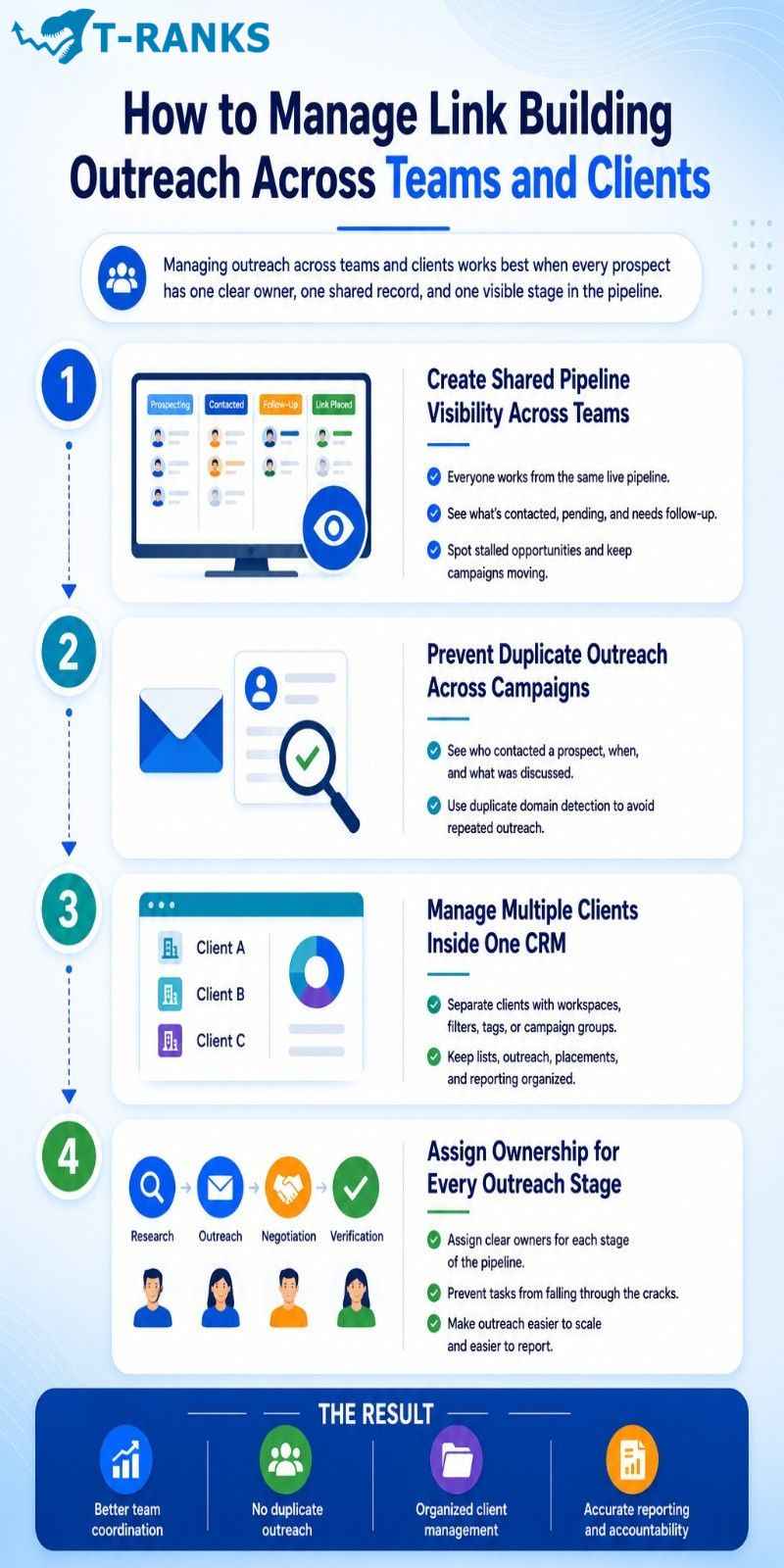
Managing outreach across teams and clients works best when every prospect has one clear owner, one shared record, and one visible stage in the pipeline. The goal is to prevent overlap, keep reporting organized, and make sure campaigns move forward without confusion.
Create shared pipeline visibility across teams
All team members should work from the same live pipeline view so they can see what has been contacted, what is pending, and what still needs follow-up. Shared visibility makes it easier to coordinate outreach, monitor campaign progress, and spot stalled opportunities before they go cold.
It also helps outreach teams maintain workflow consistency because everyone can quickly understand what happened last and what action needs to happen next.
Prevent duplicate outreach across campaigns
Duplicate outreach usually happens when different people work from separate spreadsheets, inboxes, or notes. A shared CRM solves this problem by showing who contacted a prospect, when they were contacted, and what was already discussed.
Many CRM systems also support duplicate domain detection, which helps prevent the same publisher from receiving repeated outreach from different campaigns or team members.
Manage multiple clients inside one CRM
When one outreach team handles several clients, the CRM should separate each account clearly through workspaces, filters, tags, or campaign groups. This keeps prospect lists, outreach records, placements, and reporting organized without mixing data between clients.
A structured multi-client setup also makes campaign management easier because teams can switch between accounts without losing workflow visibility.
Assign ownership for every outreach stage
Every stage in the outreach pipeline should have a clear owner, whether that includes prospect research, sending outreach emails, managing negotiations, handling publisher relationships, or verifying live links.
Clear ownership prevents tasks from being assumed by everyone and completed by no one. When every team member understands their role, outreach becomes easier to scale and much easier to report on accurately.
How to Measure Link Building Outreach Performance
Measuring outreach performance works best when the CRM tracks both activity and outcomes across the entire pipeline. The goal is not just to count emails sent, but to understand which outreach efforts actually produce replies, placements, and long-term link acquisition results.
The most important outreach KPIs to track
A link building CRM should track the core metrics that show whether outreach campaigns are improving or slowing down. Important outreach KPIs usually include reply rate, positive response rate, outreach-to-placement conversion rate, pipeline velocity, average Domain Rating (DR) of placed links, and total links placed per month.
These metrics help SEO teams measure outreach quality instead of focusing only on outreach volume. Over time, KPI tracking also makes it easier to compare campaign performance, outreach angles, and publisher response patterns.
How to identify pipeline problems early
A CRM helps teams identify outreach problems before campaigns start failing completely. One of the biggest advantages of pipeline tracking is visibility into where prospects stop moving forward.
Common warning signs include drop-off stages, stalled negotiations, poor-performing outreach segments, and workflow bottlenecks. For example, strong reply rates but low placement rates may signal negotiation problems, while weak replies may point toward poor prospect targeting or weak personalization.
How to build better client reports from CRM data
A CRM makes client reporting more organized because outreach activity, placements, and campaign progress are already stored inside one system. This allows SEO teams to generate cleaner reports without manually collecting data from multiple spreadsheets or inboxes.
Most outreach reports include campaign summaries, placement reports, outreach progress updates, and performance dashboards. Clear reporting helps clients understand not only how many backlinks were built, but also how the outreach pipeline is performing overall.
Which Link Building CRM Tools Are Best for Different Workflows?
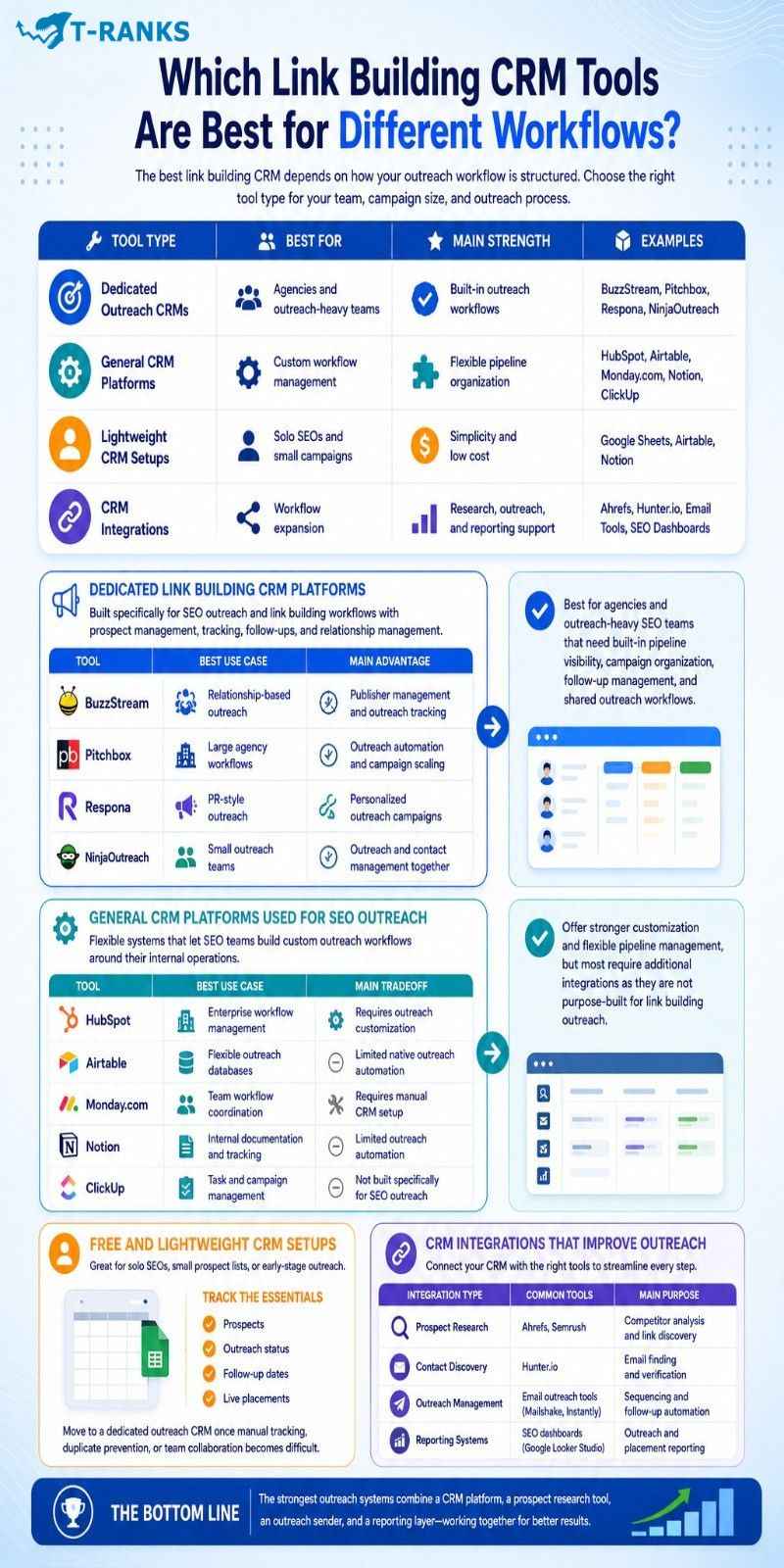
The best link building CRM depends on how your outreach workflow is structured. Some tools are built specifically for outreach management, while others work better for custom workflows, lightweight campaigns, or multi-team operations.
| Tool Type | Best For | Main Strength |
| Dedicated outreach CRMs | Agencies and outreach-heavy teams | Built-in outreach workflows |
| General CRM platforms | Custom workflow management | Flexible pipeline organization |
| Lightweight CRM setups | Solo SEOs and small campaigns | Simplicity and low cost |
| CRM integrations | Workflow expansion | Research, outreach, and reporting support |
Dedicated Link Building CRM Platforms
Dedicated outreach CRMs are built specifically for SEO outreach and link building workflows. Tools like BuzzStream, Pitchbox, Respona, and NinjaOutreach combine prospect management, outreach tracking, follow-ups, and relationship management inside one system.
| Tool | Best Use Case | Main Advantage |
| BuzzStream | Relationship-based outreach | Publisher management and outreach tracking |
| Pitchbox | Large agency workflows | Outreach automation and campaign scaling |
| Respona | PR-style outreach | Personalized outreach campaigns |
| NinjaOutreach | Small outreach teams | Outreach and contact management together |
These tools work best for agencies and outreach-heavy SEO teams that need built-in pipeline visibility, campaign organization, follow-up management, and shared outreach workflows.
General CRM Platforms Used for SEO Outreach
Some SEO teams prefer flexible workflow systems instead of dedicated outreach CRMs. Platforms like HubSpot, Airtable, Monday.com, Notion, and ClickUp allow teams to build custom outreach workflows around their internal operations.
| Tool | Best Use Case | Main Tradeoff |
| HubSpot | Enterprise workflow management | Requires outreach customization |
| Airtable | Flexible outreach databases | Limited native outreach automation |
| Monday.com | Team workflow coordination | Requires manual CRM setup |
| Notion | Internal documentation and tracking | Limited outreach automation |
| ClickUp | Task and campaign management | Not built specifically for SEO outreach |
These platforms offer stronger workflow customization and flexible pipeline management, but most require additional integrations because they are not purpose-built for link building outreach.
Free and Lightweight CRM Setups
Many outreach campaigns begin with lightweight systems like Google Sheets, Airtable, or Notion. These setups work well for solo SEO workflows, smaller prospect lists, or early-stage outreach operations.
A minimum viable outreach setup usually tracks:
- prospects
- outreach status
- follow-up dates
- live placements
Most teams move to a dedicated outreach CRM once manual tracking, duplicate prevention, or team collaboration becomes difficult to manage consistently.
CRM Integrations That Improve Outreach Workflows
Most outreach systems become more effective when the CRM connects with supporting SEO and outreach tools.
| Integration Type | Common Tools | Main Purpose |
| Prospect research | Ahrefs, Semrush | Competitor analysis and link discovery |
| Contact discovery | Hunter.io | Email finding and verification |
| Outreach management | Email outreach tools | Sequencing and follow-up automation |
| Reporting systems | SEO dashboards | Outreach and placement reporting |
In practice, the strongest outreach systems usually combine a CRM platform, a prospect research tool, an outreach sender, and a reporting layer instead of relying on one tool to handle the entire workflow alone.
Common Link Building CRM Mistakes That Quietly Kill Campaign Results

Many link building campaigns fail because the outreach pipeline becomes disorganized over time. Most CRM problems are not caused by the tool itself. They usually come from inconsistent workflows, weak prospect qualification, and poor outreach management habits.
Mistake 1: Adding too many unnecessary CRM fields
One common mistake is creating too many fields that nobody updates consistently. When the CRM becomes difficult to maintain, team members stop entering clean data, which slowly turns the system into an unreliable workflow database.
Mistake 2: Prioritizing DR over relevance and traffic quality
Many teams move prospects forward based only on Domain Rating (DR) while ignoring topical relevance and traffic quality. A highly relevant site with engaged organic traffic often provides stronger SEO value than a high-DR domain with weak niche alignment.
Mistake 3: Treating one non-reply as a dead prospect
Some outreach campaigns fail because teams send one email, get no reply, and immediately abandon the prospect. In reality, many successful placements happen after structured follow-ups and consistent outreach timing.
Mistake 4: Re-contacting publishers without checking outreach history
Another common mistake is emailing a site owner again without reviewing previous outreach records. This can create repetitive conversations, duplicate outreach, and damaged publisher relationships.
Mistake 5: Measuring success only by links placed
Some SEO teams focus only on the number of placed backlinks while ignoring reply rate, pipeline velocity, and outreach-to-placement conversion rate. This creates incomplete reporting because outreach activity alone does not always reflect campaign quality.
Mistake 6: Choosing a CRM based only on features
A CRM may look powerful on paper but still fail operationally if it does not fit the team’s actual workflow. Many outreach systems become inefficient because the tool was selected for features instead of day-to-day usability.
Mistake 7: Filling the CRM with unqualified prospects
Many outreach databases become overloaded with hundreds of prospects that are never qualified, updated, or removed. Over time, this creates cluttered pipelines that reduce visibility and make campaign management harder to maintain consistently.
How AI Is Changing Link Building CRM Workflows

AI is changing link building CRM workflows by automating prospect research, improving outreach personalization, and helping teams manage outreach pipelines more efficiently.
Modern AI-powered CRM systems can now help teams:
- find relevant domains
- pull contact information
- score prospects by relevance
- personalize outreach drafts
- flag stalled prospects
- suggest follow-up actions automatically
This reduces repetitive manual work and helps outreach teams scale campaigns faster without losing workflow visibility.
At the same time, AI-generated outreach can become risky when the messaging feels generic or overly templated. The most effective outreach systems still follow one rule: AI handles volume, while humans handle relationships.
Conclusion
In conclusion, a link building CRM helps SEO teams organize outreach workflows, manage follow-ups, track publisher relationships, and scale campaigns more efficiently. The real advantage comes from building a structured pipeline where prospect qualification, outreach tracking, personalization, reporting, and relationship management work together inside one system.
Successful outreach campaigns are not built on outreach volume alone. They depend on clean workflow management, consistent follow-ups, accurate data tracking, and long-term publisher relationships. Teams that combine structured CRM processes with smart automation and human-driven communication usually achieve stronger reply rates, better placements, and more sustainable link acquisition over time.
If your outreach pipeline is becoming difficult to manage across spreadsheets, inboxes, and disconnected tools, now is the right time to build a structured CRM workflow that improves visibility, organization, and campaign scalability.
FAQs About Link Building CRM
What is a link building CRM?
A link building CRM is a system used to manage outreach campaigns, track follow-ups, organize publisher relationships, and monitor backlink placements. It helps SEO teams centralize outreach workflows instead of relying on scattered spreadsheets or disconnected tools.
What is the difference between a link building CRM and an outreach tool?
A link building CRM manages the full outreach pipeline, while outreach tools mainly focus on email sending and automation. CRM systems also track negotiations, relationship history, placements, workflow stages, and reporting.
Can I use Google Sheets instead of a link building CRM?
Yes, Google Sheets can work for small outreach campaigns with limited prospect volume. However, spreadsheets become difficult to manage once outreach workflows involve teams, multiple clients, or large outreach pipelines.
When should an SEO team move from spreadsheets to a CRM?
SEO teams usually need a CRM when outreach becomes difficult to track manually. Missed follow-ups, duplicate outreach, poor visibility, and growing prospect databases are common signs that the workflow has outgrown spreadsheets.
What data should be tracked inside a link building CRM?
A link building CRM should track contact information, outreach stages, follow-up dates, website metrics, negotiation history, and live backlink details. Many SEO teams also track DR, traffic estimates, anchor text, and placement type for reporting.
What are the most important stages in a link building outreach pipeline?
Most outreach pipelines include prospecting, contacted, followed up, negotiation, link placed, and rejected stages. Clear stages improve workflow visibility and help teams identify where opportunities are progressing or getting stuck.
Why do most link building outreach campaigns fail?
Most outreach campaigns fail because of poor prospect targeting, weak follow-ups, and disorganized workflow management. Generic outreach emails and inconsistent relationship tracking also reduce response and placement rates.
Does outreach automation improve link building results?
Yes, outreach automation improves efficiency for repetitive tasks like reminders, follow-ups, and campaign tracking. However, personalized outreach still performs better for high-authority publishers and relationship-based campaigns.
What is a good outreach reply rate for link building?
A healthy outreach reply rate is usually above 5%, although the benchmark varies by niche and campaign quality. Low reply rates often signal poor targeting, weak messaging, or email deliverability problems.
Why is relevance more important than Domain Rating (DR)?
Relevant backlinks usually provide stronger SEO value than unrelated high-DR links. Search engines evaluate topical relevance and contextual fit, not just authority metrics from SEO tools.
What are the best CRM tools for link building outreach?
Popular link building CRM tools include BuzzStream, Pitchbox, Respona, and HubSpot. The best choice depends on outreach volume, team size, workflow complexity, and reporting needs.
How does AI help with link building CRM workflows?
AI helps automate prospect qualification, outreach personalization, workflow organization, and campaign analysis. Most SEO teams use AI to reduce repetitive operational work while keeping human oversight for relationship management.