Finding good backlink opportunities takes time. Many websites struggle to discover mentions, outreach prospects, and relevant websites before competitors do.
That is where Google Alerts link building becomes useful. It helps you monitor brand mentions, competitor names, industry topics, and content opportunities across the web. When someone mentions your business, product, service, or niche topic, Google Alerts can notify you so you can turn that mention into a possible backlink.
This method is simple, free, and practical. It works well for beginners, small businesses, SEO teams, and agencies that want to find link opportunities without checking Google manually every day.
In this guide, you will learn how Google Alerts works, how to set it up for SEO, which alerts to create, how to find link opportunities, and how to turn mentions into backlinks through smart outreach.
What Is Google Alerts and How Does It Help With Link Building?

Google Alerts is a free tool from Google that helps users monitor new content published online for specific keywords or phrases. When Google finds new pages related to your selected query, it sends notifications directly to your email.
This tool is widely used by SEO professionals, marketers, and businesses because it helps track brand mentions, competitor discussions, industry topics, and new content opportunities without searching Google manually every day.
For example, you can create alerts for:
- Your brand name
- Competitor names
- Product or service keywords
- Industry topics
- Local business terms
This is why many SEO professionals use google alerts link building strategies to discover backlink opportunities. Instead of constantly checking search results, Google Alerts helps surface new mentions and discussions automatically.
However, one important thing needs to be understood before using it for SEO.
Google Alerts does not directly show backlinks pointing to your website. It only shows mentions and newly indexed content related to your keywords.
For example, a blog may mention your business name without linking to your website. In that case, Google Alerts helps you discover the mention, but you still need outreach to request the backlink.
This distinction matters because Google Alerts works as a monitoring and prospecting tool, not a full backlink analysis tool like Ahrefs or Semrush. It helps you find opportunities early so you can turn mentions into backlinks through proper outreach.
Google Alerts for Link Building, Free Access and Real Limitations
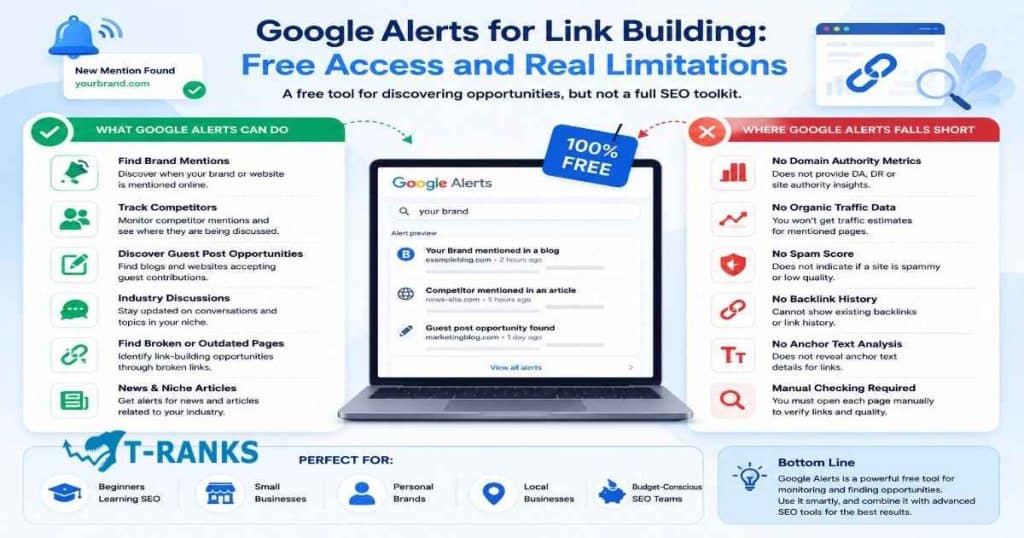
Google Alerts is completely free to use, which is one reason many SEO professionals and businesses still use it for link building research and brand monitoring.
However, it is important to understand both its strengths and limitations before building a workflow around it. Google Alerts can uncover useful outreach opportunities, but it does not work like a complete backlink analysis platform.
What Google Alerts Can Realistically Do for Link Building
Google Alerts can help discover new opportunities by tracking mentions and newly indexed content related to your keywords.
For example, it can surface:
- Brand mentions
- Competitor mentions
- Guest post opportunities
- Industry discussions
- Broken or outdated pages
- News articles related to your niche
These alerts can then become outreach leads for link building campaigns.
For example, if a website mentions your business without linking to your site, you can contact the publisher and request a backlink. Similarly, if you discover blogs regularly covering your industry, they may become guest posting or partnership opportunities.
For many users, Google Alerts alone is enough for:
- Basic brand monitoring
- Small outreach campaigns
- Local SEO prospecting
- Finding unlinked mentions
- Monitoring competitor activity
This approach works especially well for:
- Beginners learning SEO
- Small business websites
- Personal brands
- Local businesses
- Budget conscious SEO teams
Because the tool is free, it allows users to start link prospecting without paying for expensive SEO software.
Where Google Alerts Falls Short
Google Alerts also has several important limitations that users should understand.
One major issue is coverage. Google Alerts misses a large percentage of web mentions, especially on smaller websites, forums, or newly published pages that Google has not indexed yet.
It also does not provide:
- Domain authority metrics
- Organic traffic estimates
- Spam scores
- Backlink history
- Anchor text analysis
Another limitation is that Google Alerts cannot automatically confirm whether a mention already contains a backlink. You usually need to open the page manually to check if the mention is linked or unlinked.
This becomes more important during advanced SEO campaigns where backlink quality, traffic analysis, and competitor research matter heavily.
However, for simple monitoring, outreach discovery, and early stage link building, these limitations often do not prevent Google Alerts from being useful.
Why Google Alerts Is Useful for Link Building

Google Alerts is useful for link building because it helps discover new mentions, content opportunities, and industry discussions without manually searching Google every day.
Instead of checking websites one by one, Google Alerts automatically sends notifications when new content appears related to your selected keywords. This saves time and helps SEO professionals react faster to potential backlink opportunities.
One of the biggest advantages of using Google Alerts for SEO is finding unlinked brand mentions. These are websites that mention your business, product, or content without linking to your website.
For example, a blog may mention your company in an article without adding a backlink. Google Alerts helps you discover that mention so you can contact the publisher and request a link.
Google Alerts is also useful for monitoring competitor mentions. When competitors appear in blog posts, news articles, or industry discussions, those websites may also become outreach opportunities for your business.
This helps link builders discover:
- Websites covering their niche
- Blogs actively publishing industry content
- Publications mentioning similar businesses
- Potential partnership opportunities
Another reason many marketers use Google Alerts link building strategies is to discover guest post opportunities. By tracking industry keywords and content discussions, you can find blogs regularly publishing content related to your niche.
This approach works well for:
- Guest posting
- Contributor outreach
- Podcast opportunities
- Industry interviews
- Digital PR campaigns
Google Alerts also helps track industry trends and news. When new topics start gaining attention, SEO teams can respond quickly with outreach, content creation, or expert commentary before competitors react.
One of the biggest benefits of Google Alerts is passive monitoring. Instead of manually searching for opportunities every day, alerts automatically bring new prospects to your inbox.
This makes the process faster, simpler, and more scalable for:
- Beginners learning SEO
- Small business owners
- Personal brands
- Local businesses
- Budget conscious SEO teams
Because the tool is free and easy to use, it remains one of the simplest ways to start finding backlink opportunities online.
How to Set Up Google Alerts for SEO
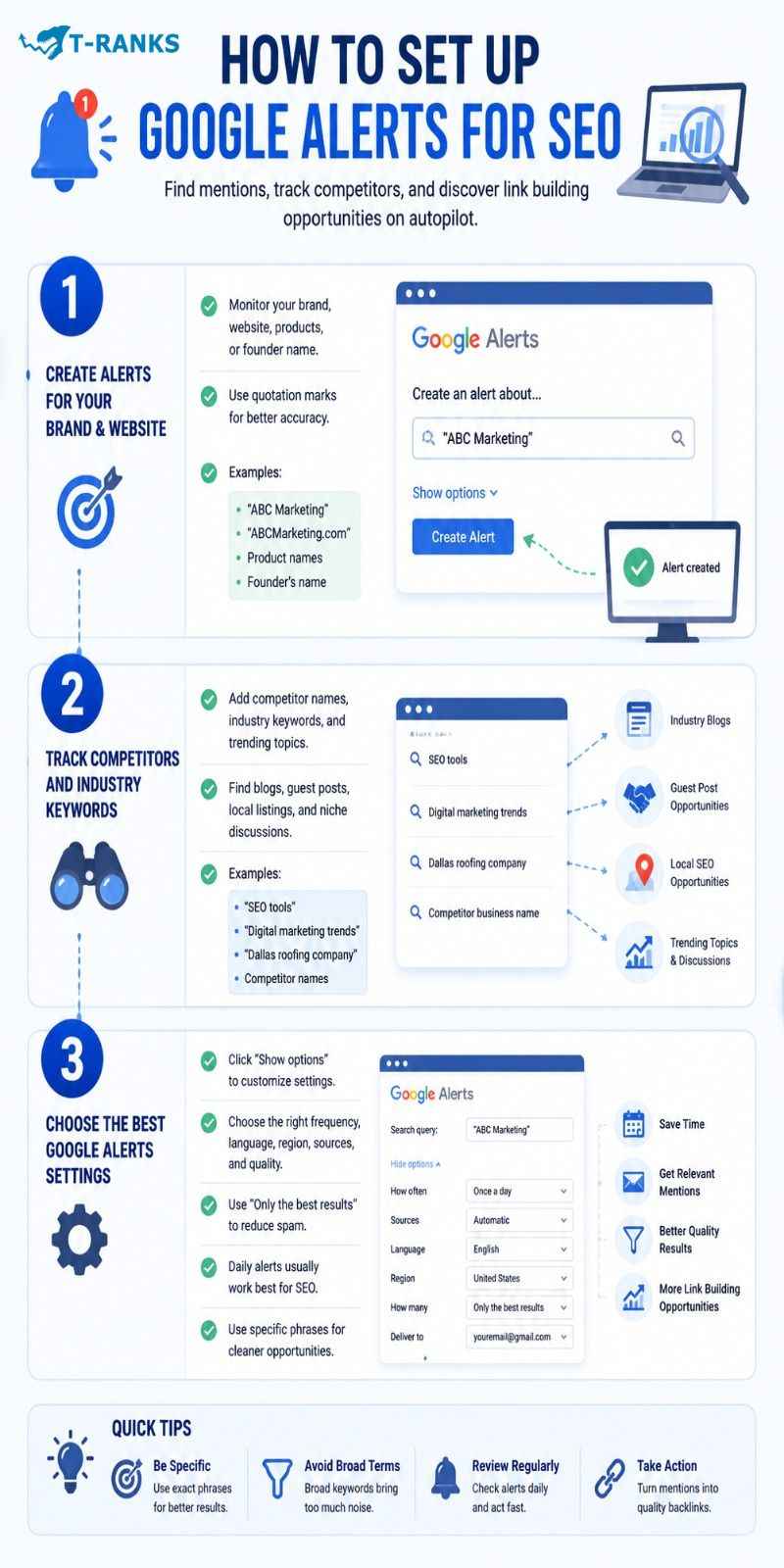
Setting up Google Alerts correctly is important because the quality of your alerts affects the quality of your link building opportunities. Well targeted alerts help uncover useful mentions, outreach leads, and industry discussions without manually searching Google every day.
Create Alerts for Your Brand and Website
Open the tool by visiting Google Alerts. Make sure you are logged in with your Google or Gmail account before creating alerts.
After opening the dashboard, enter your brand name, product name, service name, founder name, or website name into the search box provided. These alerts help monitor mentions that may later become backlink opportunities.
For example, if your business is called “ABC Marketing,” you can create alerts for:
“ABC Marketing”
“ABCMarketing.com”
Your product names
Your founder’s name
Using quotation marks around your brand name usually improves accuracy and reduces unrelated results.
Once you finish entering the keywords, click “Create Alert” to save them.
Track Competitors and Industry Keywords
After creating brand alerts, you can add competitor names and industry keywords to discover more outreach opportunities.
Enter competitor brand names, local SEO keywords, trending topics, or industry phrases into the alert box. This helps identify websites already discussing your niche or publishing related content.
For example, you can track:
“SEO tools”
“digital marketing trends”
“Dallas roofing company”
Competitor business names
These alerts are useful for finding industry blogs, guest posting opportunities, local backlink opportunities, and trending discussions before competitors react.
Choose the Best Google Alerts Settings
Before creating the alert, click the “Show options” menu to customize how alerts are delivered.
Google Alerts allows you to customize:
- Alert frequency
- Language
- Geographic region
- Content sources
- Delivery email
- Result quality
For most SEO campaigns, choosing “Only the best results” helps reduce spammy notifications and low quality pages.
Daily alerts usually work well because they provide regular monitoring without flooding your inbox.
To improve alert quality further, use specific phrases instead of broad keywords. More targeted alerts usually generate cleaner outreach opportunities and better SEO prospecting results.
Best Link Building Opportunities You Can Find With Google Alerts
Google Alerts can help uncover several types of backlink opportunities by monitoring new mentions, discussions, and industry content across the web.
Instead of manually searching every day, you can use alerts to discover websites already talking about your business, competitors, or niche topics. Many of these mentions can later become outreach and backlink opportunities.
Unlinked Brand Mentions
One of the easiest link building opportunities comes from unlinked brand mentions. This happens when a website mentions your business, product, article, or company name without adding a backlink to your website.
To find these opportunities, create alerts for your brand name, website name, product names, and founder or author names. When Google Alerts sends a notification, open the page and check whether the mention already includes a link. If it does not, you can contact the publisher and request a backlink.
These opportunities often convert well because the website is already familiar with your brand and has already mentioned it naturally in the content.
Guest Post and Contributor Opportunities
Google Alerts can also help discover websites actively publishing industry content and accepting contributors.
Create alerts using keywords related to your niche, guest posting, content marketing, or trending discussions. When new articles or blog discussions appear, you can review them for guest posting or collaboration opportunities.
This strategy works well because it helps identify websites already publishing content related to your industry, making outreach feel more natural and relevant.
Competitor Link Opportunities
Competitor monitoring is another useful way to discover backlink opportunities with Google Alerts.
Create alerts for competitor business names and important industry brands. When competitors appear in articles, blog posts, or news discussions, those same websites may also become outreach opportunities for your business.
Over time, you may notice certain websites regularly mentioning businesses in your niche. These recurring publications often become strong targets for guest posting, digital PR, and industry outreach campaigns.
This approach also helps identify realistic backlink opportunities instead of randomly searching for websites manually.
Digital PR and Media Opportunities
Google Alerts is also useful for digital PR and media monitoring.
By tracking industry topics and trending keywords, you can discover journalist discussions, news coverage, podcast opportunities, interview requests, and emerging conversations related to your niche.
This allows businesses and SEO teams to react quickly when new discussions appear online. In many cases, responding early with useful insights or expert commentary can lead to backlinks and media mentions.
Local SEO Link Opportunities
Google Alerts can also help local businesses discover local backlink opportunities.
Creating alerts for city names, regional business terms, local services, and community discussions often surfaces local news websites, business associations, regional blogs, and community organizations.
These local mentions are valuable because geographically relevant backlinks can strengthen local SEO signals and improve visibility in regional search results.
For local businesses, this becomes a simple way to discover partnership and outreach opportunities without manually searching every day.
How to Check If a Link Opportunity Is Worth Pursuing

Not every website mention is worth pursuing for a backlink. Some links can improve authority and visibility, while others provide little SEO value or create spam risks.
Before sending outreach emails, it is important to evaluate the quality and relevance of the opportunity carefully.
Step 1: Check Topical Relevance
The first thing to check is whether the website is related to your industry or audience.
Backlinks usually provide more value when the website covers topics closely connected to your niche. For example, a marketing blog linking to an SEO agency is usually more valuable than a random entertainment or gaming website.
Topically relevant links often look more natural and provide stronger long term SEO value.
Step 2: Review Website Authority and Trust Signals
After checking relevance, review whether the website appears trustworthy and active.
High quality websites usually have:
- Original content
- Clear branding
- Active publishing
- Professional design
- Real audience engagement
These trust signals often show that the website is legitimate and maintained properly.
Step 3: Check Organic Traffic Quality
A website with steady organic traffic usually provides more value than an inactive website with little visibility.
You do not always need exact traffic numbers, but signs of active readership and regularly updated content are usually positive indicators.
For advanced campaigns, tools like Ahrefs or Semrush can help estimate traffic quality and visibility.
Step 4: Look for Local Relevance When Needed
For local SEO campaigns, local relevance becomes very important.
Backlinks from websites connected to your city, region, or local industry often provide stronger geographic relevance than unrelated national websites.
Local newspapers, business associations, regional blogs, and community websites can all become valuable local SEO opportunities.
Step 5: Watch for Spam Warning Signs
Some websites are poor backlink opportunities even if they mention your brand.
You should avoid websites that:
- Publish copied or low quality content
- Contain excessive advertisements
- Cover too many unrelated topics
- Exist mainly to sell backlinks
- Have obvious spam patterns
Links from these websites usually provide little long term value and may create trust issues later.
Step 6: Decide If the Mention Is Worth Outreach
Finally, decide whether the opportunity is strong enough to justify outreach.
Not every mention deserves a backlink request. Some websites may simply be too weak, irrelevant, or low quality to justify the effort.
In most cases, focusing on fewer high quality opportunities produces better long term SEO results than chasing every mention Google Alerts discovers.
How to Write Outreach Emails That Get a Response
Finding backlink opportunities is only part of the process. The next step is writing outreach emails that feel natural, relevant, and worth replying to.
Most outreach campaigns fail because the emails look automated, generic, or overly demanding. Short and personalized emails usually perform much better than long templates filled with marketing language.
Email Template for Unlinked Brand Mentions
When contacting websites for unlinked mentions, the goal is to keep the email friendly and simple.
A good subject line should stay short and reference the article or mention naturally.
Examples:
- Quick question about your article
- Thanks for mentioning [Brand Name]
- Small update for your post
The opening should show that you actually read their content. Mention the article title or a specific point from the page before requesting anything.
The backlink request itself should stay soft and conversational instead of sounding demanding.
Example template:
“Hi [Name],
I was reading your article about [Topic] and noticed you mentioned [Brand Name]. Thanks for including us.
I wanted to ask if you would consider linking the mention to our website so readers can easily find the resource you referenced.
Either way, I enjoyed the article and appreciate the mention.
Thanks,
[Your Name]”
Email Template for Broken Link Replacement
Broken link outreach works better when the email focuses on helping the website owner first.
Instead of criticizing the page, politely mention that you noticed a resource no longer works.
Then suggest your content as a possible replacement if it fits naturally.
Example template:
“Hi [Name],
I was reading your article on [Topic] and noticed one of the referenced resources no longer works.
I recently published a similar resource covering [Topic]. If helpful, you could replace the broken link with this page:
[Your URL]
Either way, I thought you would want to know about the broken reference.
Thanks,
[Your Name]”
This approach works better because it feels helpful instead of promotional.
Email Template for Guest Post Pitches
Guest post outreach usually performs better when you lead with a content idea instead of immediately asking for a backlink.
The pitch should also show familiarity with the website’s content and stay under 100 words whenever possible.
Example template:
“Hi [Name],
I recently read your article about [Topic] and liked the way you explained [Specific Point].
I had an idea for a related article:
[Proposed Topic]
I think it would fit well with your audience because it expands on the discussion around [Topic].
Let me know if you would like me to send an outline.
Thanks,
[Your Name]”
Short pitches often receive better responses because they are easier to read quickly.
How to Write a Subject Line That Gets Opened
Subject lines strongly affect outreach response rates. Short and natural subject lines usually perform better than clickbait or promotional wording.
In most cases, keeping the subject line under 7 words works best.
Good subject lines often:
- Reference the article directly
- Mention the topic naturally
- Avoid sales language
- Sound conversational
Examples:
- Quick question about your article
- Broken link on your page
- Idea for your SEO blog
Avoid spam trigger phrases like:
- Guaranteed backlinks
- Special offer
- Limited time
- Free traffic
These phrases often reduce trust and lower open rates.
When and How to Follow Up Without Being Annoying
Many website owners miss emails simply because they are busy. A polite follow up can improve response rates, but too many follow ups usually hurt outreach campaigns.
In most cases, wait 5 to 7 business days before sending a follow up email.
One follow up is usually enough. Sending repeated reminders often creates a spammy impression.
Keep the follow up very short and slightly different from the original message.
Example:
“Hi [Name],
Just following up on my previous email in case you missed it. I thought the resource might still be useful for your article on [Topic].
Thanks,
[Your Name]”
Short follow ups usually work better because they respect the recipient’s time and avoid sounding pushy.
A Simple Weekly Routine for Processing Your Google Alerts

A weekly Google Alerts routine is a simple process for reviewing alert notifications, filtering useful opportunities, and managing outreach in an organized way.
Instead of checking alerts randomly every day, processing them in one structured session helps save time and makes link building easier to manage.
Step 1 — Collect and Sort Your Alert Results
Start by reviewing all alert emails in one dedicated session each week instead of opening every notification immediately.
You do not need to read every result fully at first. Quickly scan the website name, page title, and topic to decide whether the opportunity looks relevant to your niche.
Strong opportunities usually come from industry blogs, trusted business websites, local publications, or websites already discussing topics related to your business. Weak opportunities are usually unrelated websites, spammy blogs, or low quality pages with little value.
As you review alerts, save useful opportunities inside a simple spreadsheet with the website name, page URL, contact information, and outreach status. This keeps the process organized and makes future outreach easier.
Step 2 — Qualify and Prioritize Your Prospect List
After collecting potential opportunities, review each website more carefully before starting outreach.
Check whether the website is topically relevant, trustworthy, active, and connected to your target audience. If the website looks spammy, inactive, or unrelated to your niche, remove it from the list immediately.
Next, prioritize prospects based on effort versus opportunity. Websites already mentioning your brand or discussing your niche usually become easier outreach targets than completely cold prospects.
Filtering low quality opportunities early saves time and helps maintain a cleaner backlink profile long term.
Step 3 — Send Outreach and Track Replies
Once the list is organized, send outreach emails in one focused session each week instead of spreading outreach randomly throughout the day.
Batching outreach improves consistency and makes it easier to write personalized emails without distractions.
Track the status of each opportunity using simple labels such as contacted, replied, link earned, or not interested. This helps avoid duplicate outreach and keeps follow ups organized.
For most small websites and local SEO campaigns, the entire weekly routine usually takes one to three hours depending on the number of alerts and opportunities being reviewed.
Google Alerts vs Ahrefs and Other SEO Tools

Google Alerts and advanced SEO tools serve different purposes in link building. Google Alerts focuses on monitoring mentions and discovering opportunities, while platforms like Ahrefs and Semrush provide deeper backlink analysis and competitive SEO data.
The comparison below shows the biggest differences between them.
| Feature | Google Alerts | Ahrefs / Semrush |
| Cost | Free | Paid subscription |
| Main Purpose | Mention monitoring | Full SEO analysis |
| Backlink Database | No | Yes |
| Competitor Backlink Analysis | Limited | Advanced |
| Anchor Text Analysis | No | Yes |
| Traffic Data | No | Yes |
| Brand Monitoring | Yes | Yes |
| Outreach Prospecting | Basic | Advanced |
| Ease of Use | Very simple | More technical |
| Best For | Beginners and small businesses | Agencies and advanced SEO teams |
What Google Alerts Does Well
Google Alerts works well for simple monitoring and opportunity discovery.
Its biggest advantage is that it is completely free and easy to use. You can quickly create alerts for your brand, competitors, products, or industry topics without learning complex SEO software.
The tool is especially useful for mention discovery, brand monitoring, tracking industry discussions, and passive prospecting.
Because alerts arrive automatically by email, the process becomes more passive than manually searching Google every day.
For beginners and small businesses, this simplicity is often enough to start finding outreach opportunities consistently.
Where Paid SEO Tools Are Stronger
Paid SEO tools provide much deeper data than Google Alerts.
Platforms like Ahrefs and Semrush maintain large backlink databases that help analyze websites, competitors, anchor text, and historical link growth.
These tools are stronger for backlink audits, competitor backlink analysis, historical link tracking, anchor text analysis, traffic estimation, and spam analysis.
Unlike Google Alerts, these tools can also show whether backlinks are live, lost, new, or broken.
This level of data becomes important for advanced SEO campaigns and larger websites.
When Free Alerts Are Enough
For many websites, Google Alerts alone is enough to handle basic monitoring and outreach.
This usually works well for small business SEO, beginner link building, local SEO campaigns, personal brands, brand monitoring, and simple outreach workflows.
If the goal is mainly discovering mentions and finding outreach opportunities, free alerts can provide strong value without requiring expensive subscriptions.
Many small websites successfully use Google Alerts as their main prospecting tool during the early stages of SEO growth.
When Advanced SEO Tools Become Necessary
Advanced SEO tools become more important when campaigns grow larger and require deeper analysis.
For example, agencies and larger SEO teams often need full backlink audits, technical competitor analysis, large scale prospecting, anchor text monitoring, detailed traffic analysis, and historical backlink data.
These workflows are difficult to manage using Google Alerts alone.
For large campaigns, paid tools help save time, analyze competitors more deeply, and identify backlink opportunities that basic alerts may never discover.
Advanced Ways to Use Google Alerts for SEO
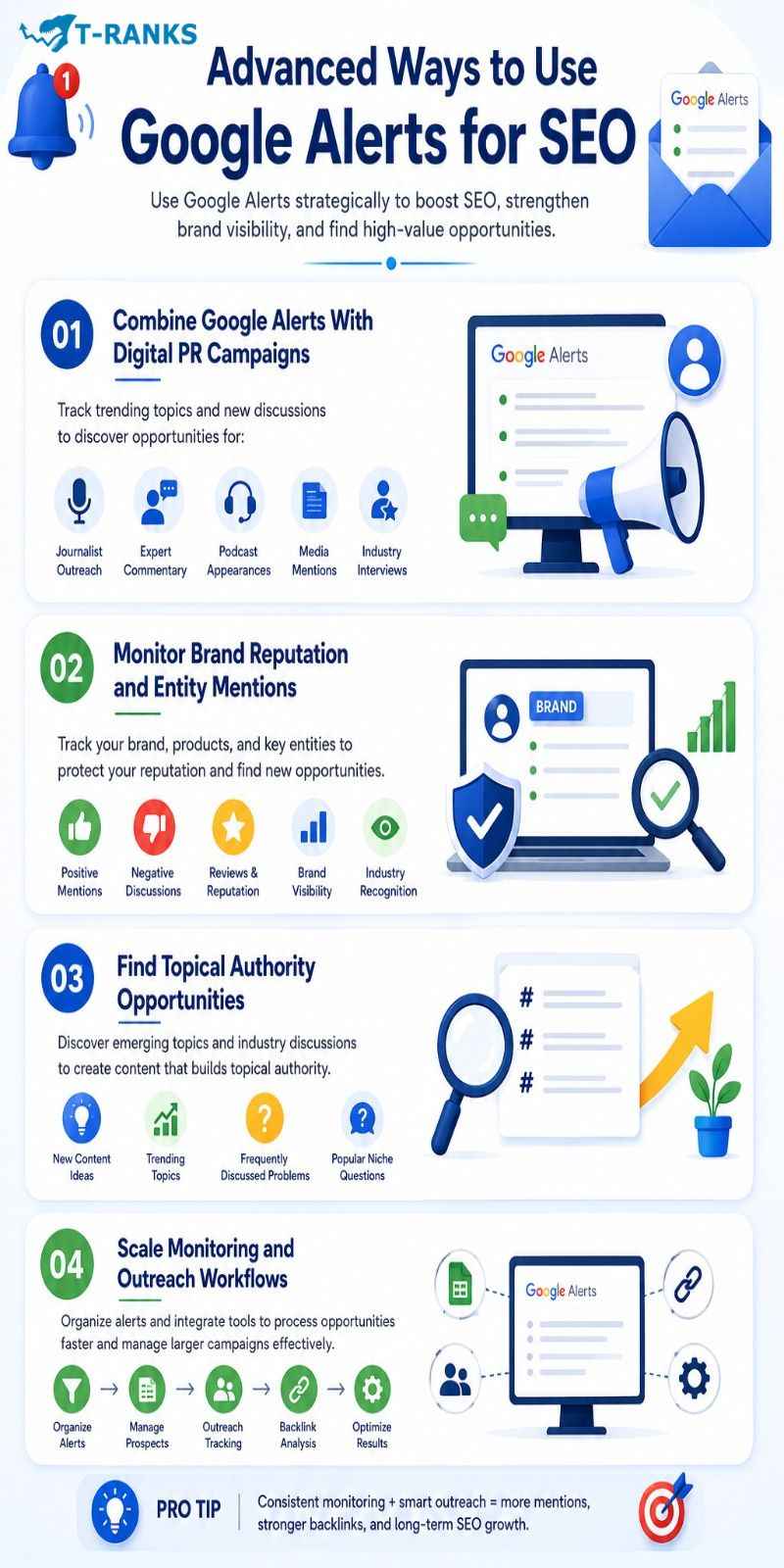
Most beginners use Google Alerts only for basic brand monitoring, but experienced SEO professionals often use it as part of larger SEO, content marketing, and digital PR workflows.
When used strategically, Google Alerts can help monitor industry trends, strengthen brand visibility, support outreach campaigns, and uncover new authority building opportunities.
Combine Google Alerts With Digital PR Campaigns
Google Alerts is useful for digital PR because it helps monitor new discussions, news coverage, and industry conversations in real time.
By tracking trending topics and important keywords, businesses can quickly discover opportunities for:
- Journalist outreach
- Expert commentary
- Podcast appearances
- Media mentions
- Industry interviews
This allows SEO teams to respond early when publishers or journalists start discussing topics related to their niche.
Over time, consistent participation in industry conversations can also help build stronger media relationships and increase brand visibility across trusted websites.
Monitor Brand Reputation and Entity Mentions
Google Alerts can also support brand reputation monitoring and entity SEO.
Entity SEO focuses on how search engines understand brands, people, businesses, and topics across the web. When your brand is mentioned consistently on relevant websites, it helps strengthen online visibility and authority signals.
By tracking your business name, founder name, products, and branded keywords, you can monitor:
- Positive mentions
- Negative discussions
- Reviews and reputation issues
- Industry recognition
- Brand visibility trends
This helps businesses respond quickly to reputation problems while also identifying new outreach and backlink opportunities.
Find Topical Authority Opportunities
Google Alerts is also useful for building topical authority.
By monitoring industry discussions and niche keywords, you can identify emerging topics before they become highly competitive.
This helps SEO teams discover:
- New content ideas
- Trending industry discussions
- Frequently discussed problems
- Popular niche questions
These insights can support content marketing strategies by helping websites publish timely and relevant content aligned with what people are actively discussing online.
Over time, consistently covering related topics can strengthen topical authority and improve search visibility.
Scale Monitoring and Outreach Workflows
As SEO campaigns grow, Google Alerts can become part of a larger monitoring and outreach system.
Instead of managing alerts randomly, many SEO teams organize them by:
- Brand monitoring
- Competitor tracking
- Local SEO
- Digital PR
- Content research
This makes it easier to process opportunities efficiently and avoid missing important mentions.
Many advanced workflows also combine Google Alerts with SEO tools, outreach spreadsheets, CRM systems, and backlink analysis platforms to manage larger campaigns more effectively.
For agencies and growing SEO teams, this creates a more scalable process for monitoring mentions, organizing prospects, and managing outreach consistently.
Does Google Alerts Still Work for Link Building in 2026?
Yes, Google Alerts still works for link building in 2026 because SEO now depends heavily on brand mentions, topical authority, and online visibility, not just backlinks alone. Monitoring mentions across the web has become more valuable in modern search systems.
AI driven search engines now evaluate entities, reputation signals, and trusted industry references more carefully. This is why consistent mentions on relevant websites can help strengthen E-E-A-T signals, brand authority, and long term search visibility.
Google Alerts still provides value by helping businesses discover unlinked mentions, competitor discussions, journalist coverage, and outreach opportunities early. While advanced SEO tools offer deeper analysis, Google Alerts remains a useful free monitoring tool for modern link building workflows.
Simple Google Alerts Workflow You Can Start Today
A simple Google Alerts workflow helps organize monitoring, outreach, and backlink tracking into one manageable process. Instead of checking alerts randomly, a structured workflow makes link building more consistent and easier to scale over time.
Start by creating alerts for your brand name, website name, competitors, industry topics, and important local keywords. These alerts usually provide the strongest opportunities for unlinked mentions, outreach leads, guest posting opportunities, and competitor monitoring.
For most websites, reviewing alerts once per day or a few times each week is enough. During each review session, scan the alerts quickly, save strong opportunities inside a spreadsheet, and remove weak or irrelevant websites from the list.
After organizing opportunities, send personalized outreach emails in one focused session instead of spreading outreach randomly throughout the day. Track the status of each opportunity using simple labels such as contacted, replied, link earned, or not interested.
Over time, this workflow becomes easier to manage and helps create a steady system for discovering backlink opportunities, monitoring brand mentions, and tracking outreach results consistently.
Common Mistakes That Stop Google Alerts From Working

Most Google Alerts problems happen because the alerts are poorly configured or the outreach process is handled incorrectly. Many users assume the tool itself is ineffective when the real problem is usually the workflow behind it.
Below are the most common mistakes that reduce the value of Google Alerts for link building.
Writing Queries That Are Too Broad
Broad keywords usually generate irrelevant notifications, spammy pages, and low quality opportunities. Specific phrases and exact match keywords almost always produce cleaner and more useful results.
Using Daily Digest Instead of As-It-Happens for Competitive Niches
In competitive industries, important opportunities can disappear quickly. “As it happens” alerts usually work better for fast moving topics, digital PR, and active outreach campaigns.
Reaching Out to Every Alert Result Without Checking Quality
Not every mention deserves outreach. Sending emails to weak, irrelevant, or spammy websites wastes time and can hurt backlink quality long term.
Sending One Email and Giving Up Immediately
Many publishers miss emails or reply later. A short and professional follow up often improves response rates more than sending large numbers of cold emails.
Using Google Alerts as the Only Link Building Method
Google Alerts is useful for monitoring mentions and discovering opportunities, but it should support a broader SEO strategy instead of replacing competitor research, content marketing, and backlink analysis completely.
Treating Every Alert Result as a Confirmed Link Opportunity
Some pages already contain backlinks, while others may come from low quality websites that are not worth contacting. Always review the page carefully before starting outreach.
Conclusion
In conclusion, Google Alerts remains one of the simplest free tools for discovering link building opportunities, monitoring brand mentions, tracking competitors, and finding outreach prospects across the web. While it does not replace advanced SEO platforms, it still provides strong value for beginners, local businesses, and SEO teams that want a consistent way to uncover new opportunities.
The biggest advantage of Google Alerts is passive monitoring. Instead of manually searching every day, businesses can automatically discover mentions, industry discussions, guest posting opportunities, and digital PR leads as new content appears online.
At the same time, long term SEO success depends more on smart outreach and relationship building than sending large numbers of generic emails. High quality opportunities, personalized communication, and consistent monitoring usually produce better backlink results over time.
If you want to build stronger backlinks, discover better outreach opportunities, and improve long term SEO growth, start creating targeted Google Alerts today and turn brand mentions into valuable link opportunities.
FAQs About Google Alerts for Link Building
What is Google Alerts and how does it work for link building?
Google Alerts is a free tool from Google that sends notifications when new web content matches your selected keywords. For link building, it helps discover brand mentions, competitor coverage, and outreach opportunities.
Is Google Alerts free to use?
Yes, Google Alerts is completely free to use. You only need a Google account to create and manage alerts.
Can Google Alerts find backlinks pointing to my site?
No, Google Alerts does not directly show backlinks. It only finds mentions related to your keywords, so each result must be checked manually to confirm whether a backlink exists.
What link building opportunities can Google Alerts find?
Google Alerts can help discover unlinked brand mentions, competitor backlink opportunities, guest posting opportunities, broken link replacement opportunities, and industry resource pages.
What is the best alert frequency setting for link building?
“As it happens” is usually the best setting for link building. Faster alerts help you react quickly to fresh mentions and outreach opportunities before competitors do.
Why are my Google Alerts returning irrelevant results?
Your alert queries are probably too broad. Using quotation marks, excluding unrelated terms, and targeting more specific phrases usually improves alert quality.
What is an unlinked brand mention and why does it matter?
An unlinked brand mention happens when a website mentions your brand without linking to your website. These opportunities are easier to convert because the publisher already knows your brand.
How is Google Alerts different from Ahrefs Alerts or Semrush?
Google Alerts focuses on free mention monitoring, while Ahrefs and Semrush provide backlink databases, traffic analysis, competitor research, and advanced SEO filtering.
Can I use Google Alerts to monitor competitor backlinks?
Yes, competitor alerts help identify websites mentioning businesses in your niche. These websites may also become outreach or guest posting opportunities for your business.
How do I turn a Google Alert result into a backlink?
First check whether the page already links to your website. If no backlink exists, contact the author or publisher with a short personalized outreach email requesting the link naturally.
Is Google Alerts still worth using for link building in 2026?
Yes, Google Alerts is still useful for beginners, small businesses, and budget conscious SEO campaigns. It works best as a free monitoring and prospecting tool within a broader SEO strategy.
What is the biggest mistake people make with Google Alerts?
The biggest mistake is creating broad alerts that generate irrelevant results. Many users also skip prospect qualification and send outreach emails to low quality websites.