Imagine several private blog network (PBN) websites using different designs and content but repeatedly publishing the same stock photos, image filenames, or metadata. These similarities may seem harmless on their own, but together they can reveal patterns in how the websites manage their images.
PBN image footprints are repeated visual and technical patterns that may suggest connections between websites. They can appear through reused images, matching EXIF metadata, similar filenames, and shared image publishing methods. However, one matching image or metadata field does not prove that websites belong to the same network.
Tools such as Google Lens and TinEye can help identify reused or modified images, while metadata inspection can reveal information stored within image files. WordPress media URLs and image processing settings may also show similarities across websites.
This guide explains how PBN image footprints develop, how to detect them, which patterns deserve attention, and what they mean for SEO risks and Google’s spam policies.
What Are PBN Image Footprints?
PBN image footprints are repeated visual or technical characteristics in website images that may indicate connections between private blog network (PBN) sites. These similarities can involve the images themselves, information stored within image files, or the way images are published.
For example, several PBN websites might repeatedly use the same uncommon photographs, identical image naming patterns, or matching creator information. These similarities can suggest that the websites share image sources or publishing processes.
However, a single shared image does not establish a connection. Many unrelated websites use the same stock photos, image formats, and content management systems.
What Are the Main Types of PBN Image Footprints?

PBN image footprints generally fall into five categories:
- Visual footprints: The same photographs, stock images, illustrations, or modified versions appear across different websites.
- Metadata footprints: Image files contain matching EXIF, IPTC, or XMP details, including creator information or editing software.
- File footprints: Images share distinctive filenames, dimensions, or other file properties.
- Publishing footprints: Websites use similar image processing settings, upload structures, or WordPress media configurations.
- Hosting footprints: Multiple websites reference the same image URLs or custom media hosting infrastructure.
Each category represents a different way that images can reveal similarities between websites.
What Makes PBN Image Footprints Different From Normal Image Similarities?
PBN image footprints become more informative when unusual similarities appear repeatedly across the same group of websites. Normal image similarities, by contrast, are common across unrelated sites.
For example, two blogs using the same popular stock photo is not strong evidence of a connection. But several websites consistently using the same uncommon illustrations, custom image naming rules, and matching metadata may indicate a shared publishing workflow.
The difference lies in how distinctive and consistent the similarities are, not simply whether two websites use the same image.
In short, PBN image footprints are potential signs of shared image management practices, not automatic proof that websites belong to the same network.
Can Google Detect Reused Images Across Different Websites?
Yes, Google can recognize reused and visually similar images across different websites. Google Lens can find websites containing the same image or a similar version, even when the files have different names or appear on separate domains.
However, recognizing duplicate images is not the same as identifying a private blog network (PBN). Google has not publicly confirmed that sharing an image automatically exposes a PBN or triggers a search ranking penalty.
Can Google Recognize Cropped, Resized, or Edited Images?
Yes, image recognition technology can identify some modified versions of an original image. Cropping, resizing, changing colors, or converting a JPEG to WebP does not necessarily make an image visually unrecognizable.
For example, a website may crop a stock photo for its homepage while another uses the full image in a blog post. Although the files look slightly different, they still share the same original visual.
Reverse image search tools such as Google Lens can help discover related images. TinEye also confirms that its technology can identify cropped, resized, and edited copies.
This means visual similarity cannot be judged by file dimensions or format alone.
Does Changing an Image Filename Prevent Image Matching?
No, changing an image filename does not prevent image recognition systems from identifying the same visual. A filename describes the file, but it does not change the picture itself.
For example, business-meeting.jpg and corporate-team.webp may contain the same stock photograph. Even with different names and formats, the image can remain visually recognizable.
Google recommends descriptive filenames because they help explain an image’s subject. However, filenames should not be confused with image identity. TinEye, for example, identifies matching images without relying on their filenames or embedded metadata.
Do Repeated Stock Photos Suggest a PBN Connection?
Repeated stock photos may suggest a connection between websites, but they are not reliable proof of a PBN on their own. Stock photography is widely used by unrelated businesses, blogs, and publishers.
For example, two websites using the same popular office photograph is ordinary. A more distinctive similarity would be several websites repeatedly using the same uncommon illustrations or images from a narrow stock collection.
Even then, the shared visuals may reflect common sourcing rather than shared ownership. Image reuse becomes more informative when it appears alongside other unusual similarities across the same websites.
Google’s ability to recognize reused images should therefore be distinguished from evidence that those websites belong to a PBN. Image matches can reveal visual relationships, but they do not independently establish ownership or a violation of Google’s spam policies.
Can EXIF and Image Metadata Reveal Connections Between Websites?
Yes, image metadata can reveal possible connections between websites. Matching creator details, timestamps, and editing information may indicate shared image sources or publishing workflows.
Image metadata is information stored within an image file. It may include camera settings, GPS coordinates, creation dates, and copyright details. Common metadata standards include EXIF, IPTC, and XMP.
For example, several private blog network (PBN) websites may publish images with the same creator information and matching GPS coordinates. Similar timestamps or editing details can provide additional clues about a shared image source.
However, matching metadata does not prove common ownership. Unrelated websites may use the same stock photos or photographers. Metadata can also be changed or removed during image editing, WordPress processing, or format conversion.
For PBN image footprint analysis, metadata is supporting evidence, not definitive proof. It becomes more useful when combined with other similarities, such as reused images, matching filenames, or shared image hosting.
Can Image Filenames, Hashes, and Hosting Patterns Reveal Website Connections?
Yes, image filenames, file hashes, and hosting patterns can reveal possible connections between websites. These technical details may indicate shared image sources, publishing tools, or hosting infrastructure.
For private blog network (PBN) analysis, these signals become more useful when unusual patterns repeatedly appear across the same websites.
Can Similar Image Filenames Reveal Website Connections?

Yes, repeated image naming patterns may suggest a shared publishing process. Websites managed through similar workflows may use identical prefixes, numbering systems, or filename structures.
For example, several websites might consistently use filenames such as seo-feature-01.webp, finance-feature-01.webp, and health-feature-01.webp. The topics differ, but the naming structure remains the same.
However, common descriptive filenames are normal. A repeated naming convention is only a useful clue when it is distinctive and appears consistently across multiple sites.
Can Image Hashes Identify Reused Files?
Yes, image hashes can identify identical files or help detect visually similar images. The result depends on the type of hashing method used.
An exact hash, such as SHA-256, identifies files with identical digital content. If two images have matching SHA-256 hashes, they contain the same file data, even if their filenames differ.
Perceptual hashing works differently. It compares visual characteristics and may identify images that have been resized, compressed, or converted into another format.
For example, two websites may publish the same photograph as JPEG and WebP files. Their exact hashes will differ, but perceptual hashing may still identify a visual match.
These methods reveal file relationships, not website ownership.
Can Shared Image Hosting Reveal Website Connections?
Yes, shared image hosting can suggest a technical connection when websites use the same custom media server or unusual image URL structure.
For example, several websites might load their images from media.example-network.com. This shared hostname provides a more specific connection than simply using the same hosting provider.
However, standard WordPress upload paths, such as /wp-content/uploads/, are common. The same applies to popular content delivery networks (CDNs) and responsive image settings.
These standard configurations do not establish a PBN relationship on their own.
For PBN image footprint analysis, filenames, hashes, and hosting patterns should be evaluated together. Repeated, distinctive similarities provide stronger grounds for investigating a shared publishing workflow than any single technical characteristic.
Can AI-Generated Images Leave Identifiable Footprints?
Yes, AI-generated images can leave identifiable footprints across websites. These may include repeated visual styles, similar image layouts, and metadata about how the images were created or edited.
Private blog network (PBN) websites may use different AI-generated images but still share recognizable production patterns. However, using the same AI image generator does not prove that websites share ownership.
Can Repeated AI Image Styles Suggest a Shared Workflow?
Yes, repeated AI image styles may suggest that websites use similar image creation workflows. These patterns can appear in image composition, lighting, backgrounds, colors, and layouts.
For example, several websites may consistently publish AI illustrations with identical 3D styles, centered objects, soft lighting, and matching backgrounds. The images may show different subjects but follow the same visual approach.
These similarities may indicate shared design templates or image generation methods. However, popular AI styles are widely used, so visual resemblance alone is weak evidence of a PBN connection.
What Can AI Image Metadata and Content Credentials Reveal?
AI image metadata and Content Credentials can provide information about an image’s origin and editing history. Depending on the file, this information may identify the creation tool, digital source type, or recorded modifications.
Content Credentials use the C2PA (Coalition for Content Provenance and Authenticity) standard to provide verifiable information about digital media. Google can also use supported C2PA and IPTC metadata to display image origin details.
For example, images published across several websites may contain similar creation tool information or provenance records. These details can help investigators compare image production methods.
However, metadata and Content Credentials are not always present. Image editing, compression, or format conversion may also remove some information.
For PBN image footprint analysis, AI image styles and provenance data are supporting clues. They become more informative when distinctive patterns repeat across multiple websites, but they cannot independently confirm shared ownership.
How Can You Detect Reused Images and Metadata Across PBN Sites?
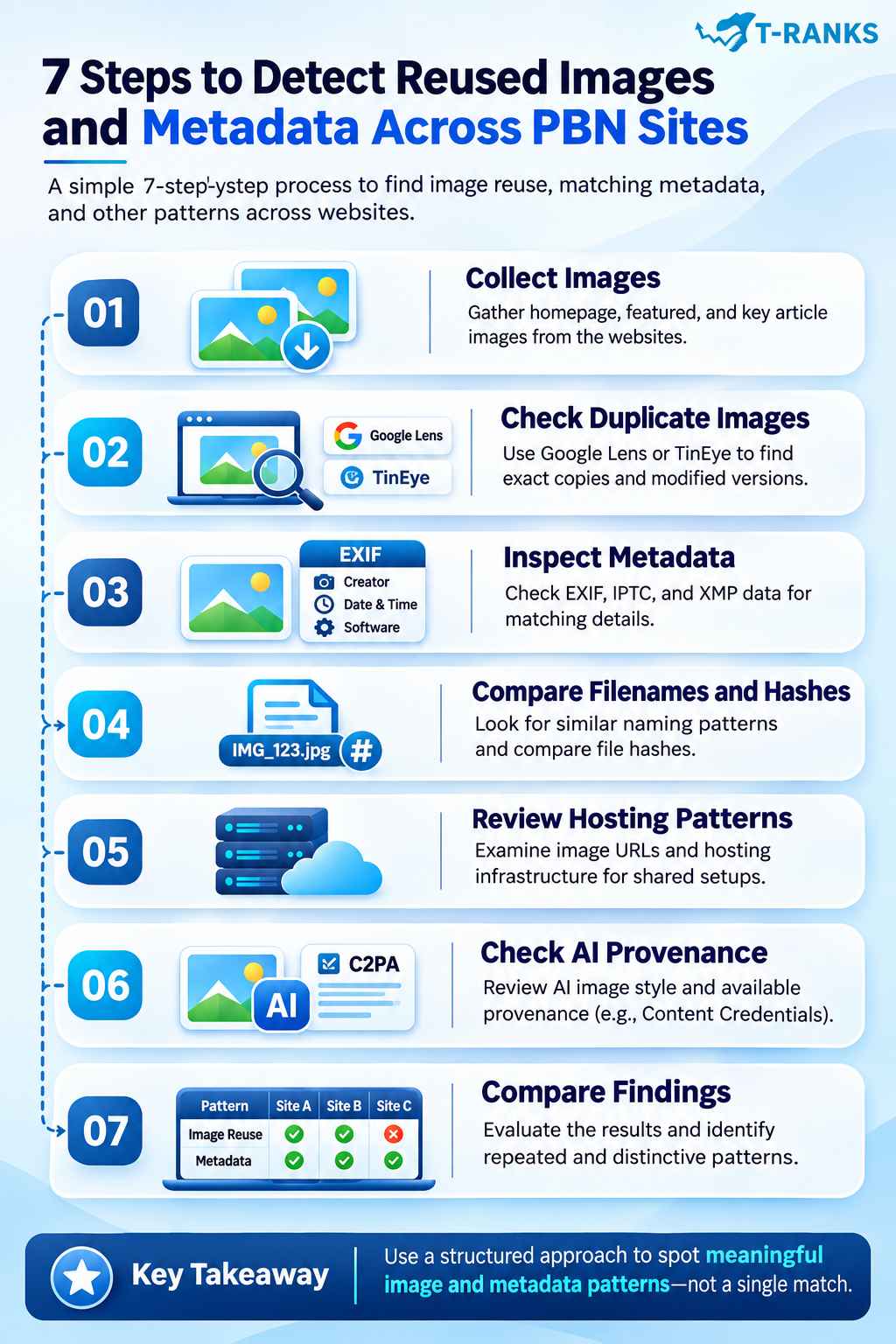
You can detect PBN image footprints by checking image reuse, metadata, file properties, and hosting patterns across websites. Tools such as Google Lens, TinEye, and ExifTool help identify similarities that may suggest shared image sources or publishing workflows.
A reliable audit starts with collecting images. It then examines visual matches, metadata, file properties, and hosting details. The final step is to compare the findings and determine which patterns deserve further investigation.
Step 1: Collect Images From the Websites
Start by gathering images from the websites you want to examine. Focus on homepage images, featured images, and important visuals within articles.
For each image, record its source page and direct image URL. You can usually find the file URL by opening the image in a new tab or inspecting the webpage’s image elements.
Organize the information in a spreadsheet.
| Field | What to record |
| Website | Domain where the image appears |
| Page URL | Page containing the image |
| Image URL | Direct URL of the published image |
| Filename | Name of the image file |
| Image source | Stock, original, AI-generated, or unknown |
| Notes | Initial observations about the image |
Include images from several pages on each website. This provides a more useful comparison than examining only one featured image per domain.
Save copies of the published image files when appropriate. These will be useful for visual matching, metadata inspection, and file analysis.
Step 2: Check for Duplicate and Modified Images
Use reverse image search to identify images that appear on multiple websites. Google Lens and TinEye can help find exact copies and visually related versions of existing images.
Follow this process:
- Open Google Lens or TinEye.
- Upload an image or submit its URL where supported.
- Review the matching images and source websites.
- Compare exact copies, cropped images, and resized versions.
- Record the relevant URLs and type of match.
For example, one website may publish a full-size stock photograph. Another may use a cropped version of the same picture. Reverse image search may reveal their common source.
Pay attention to how widely an image is used. A popular stock photo appearing across unrelated websites is usually weak evidence of a shared publishing workflow.
An uncommon custom illustration appearing repeatedly across a small group of sites is more distinctive.
Record exact copies separately from modified versions. This distinction will help when comparing the findings later.
Step 3: Inspect Image Metadata for Matching Details
Next, examine the information embedded in the downloaded image files.
Use a metadata inspection tool such as ExifTool to view available EXIF, IPTC, and XMP fields.
Focus on information that may help establish a common image source or processing history.
| Metadata field | What to examine |
| Creator or artist | Matching names or distinctive identifiers |
| Date and time | Similar capture timestamps |
| GPS information | Matching recorded locations |
| Software | Editing applications and version details |
| Copyright | Identical rights or credit information |
| Processing details | Unusual repeated metadata values |
For example, images published on several websites may contain the same distinctive creator identifier and matching editing software information.
This may suggest a common photography source or image processing workflow. However, the same details can also appear when unrelated websites use images from one stock provider.
Inspect the files actually delivered by the websites. WordPress, optimization plugins, and image conversion tools may change or remove metadata.
Also remember that metadata can be edited. Treat matching values as supporting evidence rather than confirmation of common ownership.
Step 4: Compare Image Filenames, Hashes, and File Properties
After inspecting metadata, compare the technical properties of the collected images.
Start with filenames. Look for unusual naming conventions, repeated prefixes, numbering systems, or identical filename structures.
For example:
- health-feature-01.webp
- finance-feature-01.webp
- technology-feature-01.webp
These names follow a similar pattern. However, a naming convention becomes more informative only when it is distinctive and repeatedly used across websites.
Next, compare image hashes.
SHA-256 is an exact file hash. If two downloaded files have the same SHA-256 value, their file contents match.
Perceptual hashing compares visual characteristics. It may identify similar images even when the files have different sizes, formats, or compression settings.
For example, the same photograph may appear as a JPEG on one website and a resized WebP on another. Their exact hashes will differ, but perceptual hashing may identify the visual relationship.
Also compare image dimensions, aspect ratios, and formats. These properties can provide additional context, although common dimensions and formats are weak evidence on their own.
Record exact file matches, approximate visual matches, and distinctive naming patterns separately.
Step 5: Examine Image URLs and Hosting Patterns
Now examine where the websites store and deliver their images.
Review the image URLs collected earlier. Look for repeated custom media directories, shared image hosts, and unusual URL structures.
Important details include:
- WordPress upload paths
- Custom media subdomains
- Shared image hosting servers
- Content delivery network (CDN) hostnames
- Custom thumbnail dimensions
- Repeated image delivery configurations
For example, several websites may load images from media.example-network.com. This shared hostname indicates a technical relationship worth investigating.
However, standard WordPress paths such as /wp-content/uploads/ are common. Using the same popular CDN provider also does not establish shared ownership.
Pay particular attention to customized configurations. A shared custom media server is generally more informative than identical default WordPress settings.
Record the relevant hostnames, URLs, and unusual configurations. Note whether the infrastructure is shared directly or simply uses a common third-party service.
Step 6: Check AI Image Metadata and Provenance
If the websites publish AI-generated images, examine their available creation information and visual patterns.
Start by comparing distinctive image styles. Look for repeated compositions, illustration techniques, backgrounds, and layouts.
For example, several websites may consistently publish AI illustrations with the same 3D appearance, lighting, and framing. This could reflect similar image-generation methods or shared design templates.
Where available, inspect Content Credentials or C2PA provenance records.
C2PA (Coalition for Content Provenance and Authenticity) is a standard for recording verifiable information about digital media. Depending on the file, its records may describe the creation tool or documented editing actions.
You can check supported images using a compatible Content Credentials verification tool.
However, not every AI-generated image contains accessible provenance information. Metadata may also be removed during export, editing, or image optimization.
Record available creation details and distinctive visual similarities. Do not interpret missing metadata as proof of a particular image origin.
Step 7: Compare Findings and Identify Repeated Patterns
The final step is to evaluate the collected evidence across all websites.
Create a comparison table showing which image characteristics appear on each domain.
| Image footprint | Site A | Site B | Site C |
| Same uncommon image | Yes | Yes | No |
| Matching filename convention | Yes | Yes | Yes |
| Distinctive metadata match | Yes | Yes | No |
| Identical image file | Yes | Yes | No |
| Shared custom media host | Yes | Yes | No |
| Similar AI image style | No | Yes | Yes |
Evaluate each finding using three factors:
Distinctiveness: Is the pattern unusual or commonly found across the web?
Repetition: Does the same pattern appear consistently across several websites?
Combined evidence: Do image, metadata, file, and hosting similarities occur together?
For example, two websites using WebP images provides little evidence of a connection.
However, several websites sharing the same uncommon illustrations, distinctive metadata, identical image files, and custom media host present a more meaningful pattern.
Consider alternative explanations before drawing conclusions. Websites may share photographers, developers, stock libraries, or publishing services without belonging to the same private blog network.
A useful audit report should distinguish confirmed matches from possible connections. Include supporting URLs, relevant observations, and any limitations in the evidence.
The purpose of detecting PBN image footprints is to identify repeated visual and technical relationships that deserve investigation. These findings do not independently establish common ownership or confirm how Google evaluates a network.
Can Image Footprints Cause Google Penalties for PBN Sites?
Image footprints do not automatically cause Google penalties. Reused photographs, matching metadata, and similar image filenames are not independently documented reasons for penalizing private blog network (PBN) websites.
However, PBNs created primarily to manipulate search rankings can violate Google’s spam policies. The main risk comes from manipulative linking practices, not simply from using similar images.
Does Google Penalize Websites for Using Duplicate Images?

No, using duplicate images does not automatically result in a Google penalty. Stock photos, licensed illustrations, and shared visual assets are common across legitimate websites.
For example, two business websites may use the same stock photograph. This does not mean either website violates Google’s spam policies.
However, websites that copy large amounts of content without adding value may face separate issues under Google’s spam policies. The concern is the overall publishing practice, not merely the presence of a repeated image.
Can Image Similarities Prove That Websites Belong to a PBN?
No, matching images or metadata cannot independently prove that websites belong to the same PBN. These similarities may suggest shared image sources, publishing tools, or management processes.
For example, several websites may use the same unusual illustrations and custom media hostname. This combination provides more reason to investigate than one shared stock photo.
However, a shared photographer, developer, or content management provider could explain those patterns.
Google does not publicly disclose which specific image footprints, if any, contribute to its internal PBN detection systems. Therefore, image similarities should be treated as supporting evidence rather than proof of a Google penalty.
When Do PBN Backlinks Create Google Spam Policy Risks?
PBN backlinks violate Google’s link spam policies when they are created primarily to manipulate search rankings. This includes artificial linking arrangements designed to pass ranking credit rather than provide genuine editorial value.
Google may neutralize the ranking benefit of spammy links through its automated systems. Serious violations can also result in manual actions that affect a website’s visibility in Search.
For example, a network of websites publishing low-value articles primarily to link to a target website may violate Google’s link spam policies.
Changing image filenames, removing metadata, or using different stock photos does not make manipulative backlinks compliant with Google’s policies.
If a website experiences ranking problems, its owners should review the backlink practices and check the Manual Actions report in Google Search Console before assuming image similarities caused the issue.
The main SEO risk is not the image footprint itself, but the potentially manipulative linking activity associated with the network. Image patterns may help identify relationships between websites, but Google’s documented enforcement focuses on spam policy violations.
How Can Website Owners Review and Manage Image Footprint Risks?
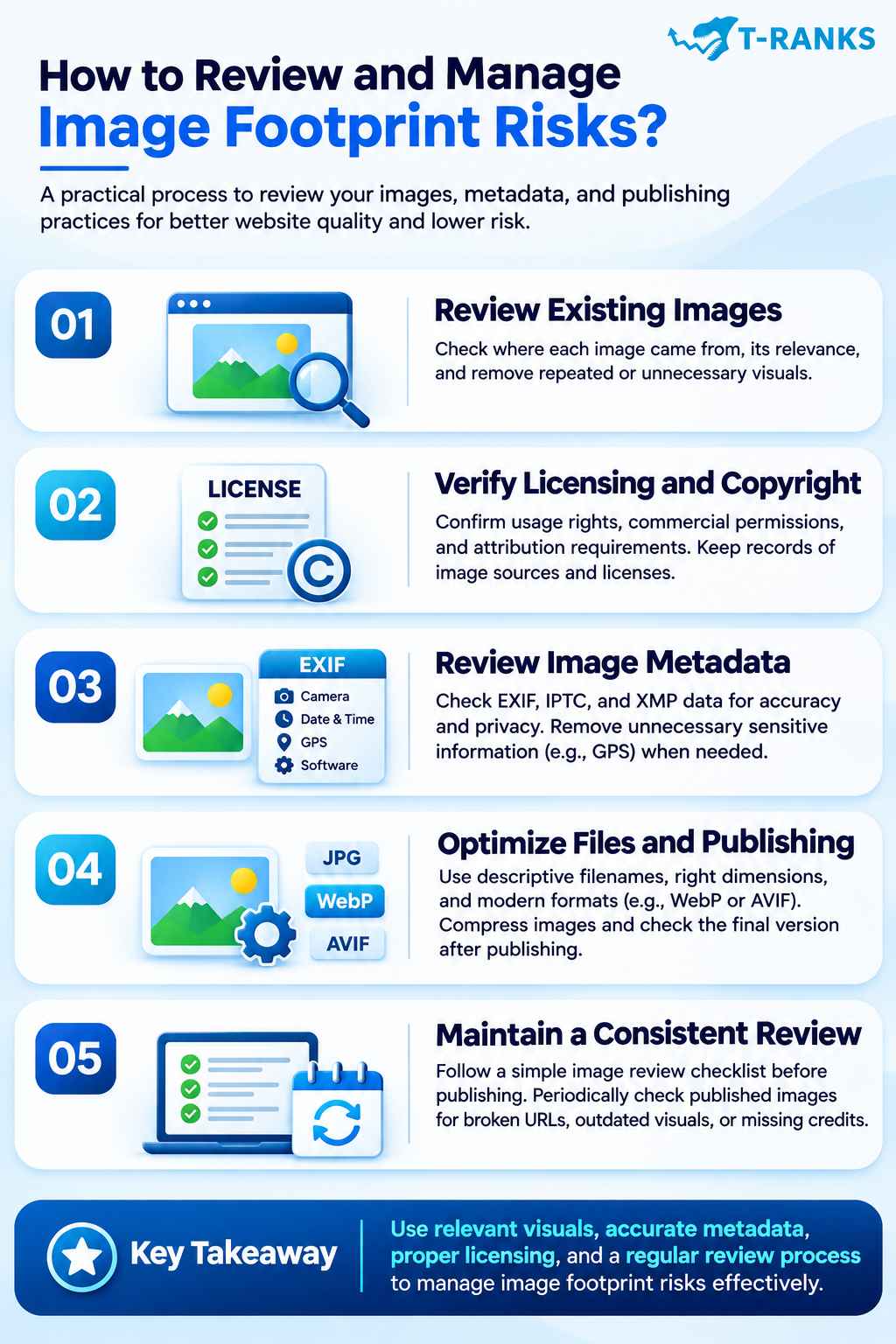
Website owners can manage image footprint risks by reviewing image sources, licensing, metadata, and publishing practices. A structured review helps identify unnecessary image duplication, inaccurate file information, and technical issues that may affect website quality.
For private blog network (PBN) websites, responsible image management is important. However, changing images or removing metadata does not make manipulative backlinks compliant with Google’s spam policies.
Step 1: Review Existing Images and Their Sources
Start by examining the images already published across your websites. Check where each image came from and whether it supports the page’s content. Look for repeated stock photos, outdated visuals, and images with unclear origins.
Prioritize images that provide useful information to readers. For example, an original process diagram may explain a technical SEO topic better than a generic office photograph. Replace irrelevant or unnecessary visuals when a more suitable image is available.
Step 2: Verify Image Licensing and Copyright
Check the usage rights of every image before publishing it. Review stock photography licenses, commercial-use permissions, attribution requirements, and restrictions on modifications. An image appearing in Google Images does not mean it is free to use.
Keep records of image sources, licenses, and creator credits where necessary. If a license requires attribution, provide it according to the licensing terms. This helps prevent copyright problems and supports responsible content publishing.
Step 3: Review EXIF, IPTC, and XMP Metadata
Examine the metadata stored in your image files. EXIF may contain camera information, timestamps, and GPS coordinates. IPTC and XMP can include creator names, copyright notices, licensing details, and other descriptive information.
Check whether this information is accurate and appropriate for public distribution. For example, a photograph may contain GPS coordinates that reveal an unintended location. Review unnecessary sensitive information while preserving legitimate copyright and attribution details.
Step 4: Optimize Image Files and Publishing Settings
Use descriptive filenames, appropriate image dimensions, and suitable file formats. Compress large images to improve loading performance without significantly reducing visual quality. Responsive image settings can also help deliver suitable image sizes across different devices.
For example, a large JPEG may be converted to WebP or AVIF when appropriate. After WordPress processing or content delivery network (CDN) optimization, inspect the published image. Confirm that it displays correctly and that important metadata has been retained where needed.
Step 5: Maintain a Consistent Image Quality Review
Establish an image review process before publishing new content. Check image relevance, licensing, filenames, visual quality, and metadata accuracy. For AI-generated images, review factual accuracy and available provenance information where relevant.
Periodically inspect published images for broken URLs, outdated visuals, missing credits, or display problems. Maintain records of important image sources and corrections. This helps website owners identify issues early and maintain reliable publishing practices.
Effective image footprint management focuses on relevant visuals, accurate metadata, proper licensing, and responsible publishing. These practices improve website quality but do not eliminate the SEO risks associated with manipulative PBN linking.
Conclusion
In conclusion, PBN image footprints can reveal possible connections between websites through repeated images, metadata, filenames, and publishing patterns. A single shared stock photo or matching EXIF field does not prove common ownership. However, several unusual similarities may suggest a shared image source or management workflow.
Tools such as Google Lens, TinEye, and ExifTool can help identify these patterns. Reviewing image hashes, WordPress media URLs, AI image provenance, and hosting configurations provides additional evidence. The key is to evaluate findings together rather than rely on one isolated signal.
Website owners should prioritize relevant images, proper licensing, accurate metadata, and reliable publishing practices. These measures support website quality, but they do not make manipulative PBN backlinks compliant with Google’s spam policies.
Want to better understand backlink quality and SEO risks? Explore T-RANKS for link building resources and services that can support more informed SEO decisions.
Frequently Asked Questions About PBN Image Footprints
What Are PBN Image Footprints?
PBN image footprints are repeated visual or technical patterns across private blog network websites. They may include reused images, matching metadata, similar filenames, or shared image hosting.
Can Google Detect the Same Image on Multiple Websites?
Yes, Google can recognize identical and visually similar images across websites. However, Google has not publicly confirmed that sharing one image automatically identifies a PBN or triggers a penalty.
Do Stock Photos Create PBN Image Footprints?
Stock photos can contribute to PBN image footprints when uncommon images or sourcing patterns repeatedly appear across websites. However, using the same popular stock photo does not prove that websites share ownership.
Does Renaming or Resizing an Image Make It Unique?
No, renaming an image does not change its visual content. Resizing changes the file, but reverse image search tools may still recognize it as a modified copy of the original.
Can EXIF Metadata Reveal Connections Between Websites?
Yes, matching EXIF metadata may suggest shared image sources or processing workflows. Camera details, timestamps, GPS coordinates, and software information can provide clues, but they cannot independently establish common ownership.
Does WordPress Automatically Remove EXIF Metadata?
No, WordPress does not automatically remove all EXIF metadata from every uploaded image. Metadata retention depends on image processing, file conversion, plugins, and the version of the image being served.
Does Image Metadata Improve Google Rankings?
Adding EXIF metadata does not provide a documented Google ranking boost. However, Google supports certain IPTC metadata fields for displaying image credits, copyright details, and licensing information.
Can AI-Generated Images Create PBN Footprints?
Yes, AI-generated images may share recognizable styles, layouts, metadata, or provenance information. These similarities can suggest common production methods but do not independently prove a PBN connection.
What Tools Can Detect PBN Image Footprints?
Google Lens and TinEye can help identify reused images. ExifTool examines embedded metadata, while hashing tools compare image files. These tools reveal similarities rather than confirm shared website ownership.
Can Image Footprints Cause Google Penalties?
Image similarities alone are not documented triggers for Google penalties. However, PBN backlinks created primarily to manipulate search rankings can violate Google’s link spam policies, regardless of the images used.